
Advertisement


Sections
Don't like how Gmail's new version looks? Here's how to switch back to the old view
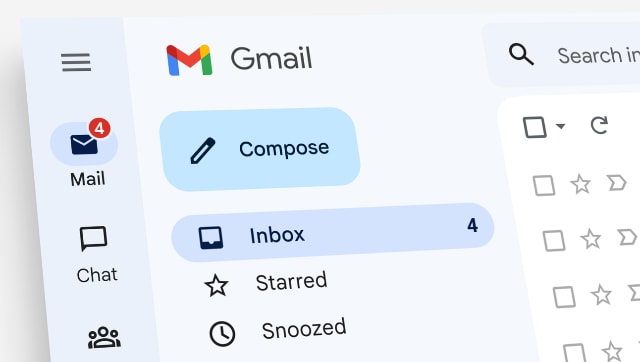
Gmail is now pushing its latest design overhaul, which was introduced in January this year, to all users. Here’s how users can revert back to the old design.

It is practically impossible to survive on the internet and not have a Google account, especially if you have an Android device. Naturally, then it would be safe to assume that there are a lot of people who use Gmail as their de facto email service provider.![Don't like how Gmail's new version looks_ Here's how to switch back to the old view]() Gmail has a habit of updating and tweaking its design and functionalities. In late January of this year, Google announced a new view that integrates Gmail, Chat, and Meet all in one location under the main menu.At first, users could opt-in and test the new design or stick with what was familiar. Now though, the design has begun rolling out to all users as default. This has led to Google getting a lot of hate and backlash.Having said that, Google is allowing users to switch back to the older view, at least for some more time now. Here’s what you need to do.How to change your Gmail back to the old designJust follow these simple steps to revert back to the old design -
Gmail has a habit of updating and tweaking its design and functionalities. In late January of this year, Google announced a new view that integrates Gmail, Chat, and Meet all in one location under the main menu.At first, users could opt-in and test the new design or stick with what was familiar. Now though, the design has begun rolling out to all users as default. This has led to Google getting a lot of hate and backlash.Having said that, Google is allowing users to switch back to the older view, at least for some more time now. Here’s what you need to do.How to change your Gmail back to the old designJust follow these simple steps to revert back to the old design - ![Don't like how Gmail's new version looks_ Here's how to switch back to the old view]() However, it would be best if you prepare yourself to use the new design interface. You won't be able to toggle between the two forever. Moreover, there will come a time when Google will simply not let users switch to the old design.Google had planned on making the new view the default experience for users by the end of Q2 2022. Google has also announced that “starting August 5th, users who had not opted-in will begin seeing the new experience by default, but can revert to classic Gmail via settings. However, within the next two months, this will become the default experience with no option to revert back.”
However, it would be best if you prepare yourself to use the new design interface. You won't be able to toggle between the two forever. Moreover, there will come a time when Google will simply not let users switch to the old design.Google had planned on making the new view the default experience for users by the end of Q2 2022. Google has also announced that “starting August 5th, users who had not opted-in will begin seeing the new experience by default, but can revert to classic Gmail via settings. However, within the next two months, this will become the default experience with no option to revert back.”
 Gmail has a habit of updating and tweaking its design and functionalities. In late January of this year, Google announced a new view that integrates Gmail, Chat, and Meet all in one location under the main menu.At first, users could opt-in and test the new design or stick with what was familiar. Now though, the design has begun rolling out to all users as default. This has led to Google getting a lot of hate and backlash.Having said that, Google is allowing users to switch back to the older view, at least for some more time now. Here’s what you need to do.How to change your Gmail back to the old designJust follow these simple steps to revert back to the old design -
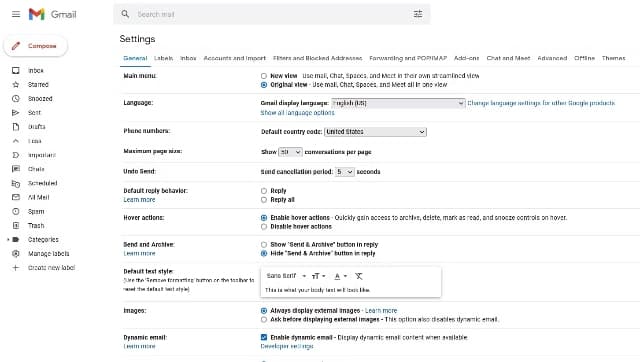
 - Click on the Quick settings gear icon in the upper right corner.
- Then, click on Go back to the original view.
- If you want to switch to the new view, repeat the process, and select Try out the new Gmail view.
- Alternatively, you can toggle the views in the See all settings menu under the General and Main menu.
 However, it would be best if you prepare yourself to use the new design interface. You won't be able to toggle between the two forever. Moreover, there will come a time when Google will simply not let users switch to the old design.Google had planned on making the new view the default experience for users by the end of Q2 2022. Google has also announced that “starting August 5th, users who had not opted-in will begin seeing the new experience by default, but can revert to classic Gmail via settings. However, within the next two months, this will become the default experience with no option to revert back.”
First Published:Aug 24, 2022, 12:57:56 IST
Advertisement
Advertisement

China’s gaming crackdown causes top 3 companies $80 bn market value loss, Tencent alone sheds $50 bn
The top three publicly listed game development and publishing studios, lost as much as $80 billion in market value, with Tencent alone shedding over $50 billion. Tencent saw its value slip by 16%, NetEase by 28 per cent, whereas Bilibili took a 14 per cent dive
What is Lensa AI and how to use the app to generate AI avatars?
You need to pay an annual subscription fee of Rs 2,499 for accessing all the features of Lensa AI.
What is Bluebugging and how do hackers use it? Learn how to secure your devices
Bluebugging attacks take advantage of Bluetooth-enabled devices. Once hacked, the attacker may modify or seize your contacts, perform and monitor conversations, read and send messages, and more.
WhatsApp to roll out ‘Message Yourself’ feature for Android and iOS users; check how you can access it
Wondering how to set up the "Message yourself"feature on WhatsApp? Users will first have to update the WhatsApp application on their smartphone in order to access the WhatsApp Message Yourself feature.
Astronomy watch face on Apple Watch enables exciting view of Solar System; check features here
The Astronomy watch face's default image of Earth includes a live cloud map that shows where you are right now.
Advertisement
Advertisement