
Advertisement


Sections
Microsoft is experimenting with an intelligent tabs feature called ‘sets’ for all Windows 10 apps; rolls out TimeLine to beta testers
Software giant Microsoft is testing a new feature known as ‘sets’ which finally brings ‘tabbed browsing to the Windows operating system.

Software giant Microsoft is testing a new feature known as ‘sets’ which finally brings ‘tabbed browsing to the Windows operating system. However, it will not be the kind of tabular interface that one would expect and where users open multiple files associated with the same program and manage them all in one window.[caption id="attachment_4232883" align="alignleft" width="380"]![Image: Microsoft]() Image: Microsoft[/caption]The company posted details about ‘Sets’ and other changes coming to the upcoming Windows Insider Preview in a post on the Windows Insider website. Terry Myerson, the EVP for Windows and Devices Group detailed all the upcoming features that the Windows team was experimenting with at Microsoft.TimelineMyerson confirmed that Microsoft is finally rolling out Timeline in the next Windows Insider Preview for the testers who are enrolled to receive Fast Ring 1 updates. The company had previously previewed the feature at its Annual BUILD conference earlier this year. For the uninitiated, Fast Ring is one of the release channels for users who test early preview builds of Windows 10. The company usually rolls out the fresh and untested features in the Fast Ring where people want to test the latest features without much worry about stability.[caption id="attachment_4232885" align="alignnone" width="1280"]
Image: Microsoft[/caption]The company posted details about ‘Sets’ and other changes coming to the upcoming Windows Insider Preview in a post on the Windows Insider website. Terry Myerson, the EVP for Windows and Devices Group detailed all the upcoming features that the Windows team was experimenting with at Microsoft.TimelineMyerson confirmed that Microsoft is finally rolling out Timeline in the next Windows Insider Preview for the testers who are enrolled to receive Fast Ring 1 updates. The company had previously previewed the feature at its Annual BUILD conference earlier this year. For the uninitiated, Fast Ring is one of the release channels for users who test early preview builds of Windows 10. The company usually rolls out the fresh and untested features in the Fast Ring where people want to test the latest features without much worry about stability.[caption id="attachment_4232885" align="alignnone" width="1280"]![Image: Microsoft]() Image: Microsoft[/caption]The Slow ring, on the other hand, is for the testers who would want to test the feature after most of the bugs have been ironed out. Both these rings are part of the ‘Development Branch’.Windows ‘Sets’Myerson detailed that ‘Sets’ is Microsoft’s attempt to make it easier for users to organise their workflow and get back to it with as little effort as possible. The tabular interface that Microsoft is working on it not limited to tabs of that same program in the same Window. Instead, the tabs here are intelligent and flexible as users can open a different program in the same window without the need to juggle around different windows with all the different tabs opened.[caption id="attachment_4232853" align="alignnone" width="857"]
Image: Microsoft[/caption]The Slow ring, on the other hand, is for the testers who would want to test the feature after most of the bugs have been ironed out. Both these rings are part of the ‘Development Branch’.Windows ‘Sets’Myerson detailed that ‘Sets’ is Microsoft’s attempt to make it easier for users to organise their workflow and get back to it with as little effort as possible. The tabular interface that Microsoft is working on it not limited to tabs of that same program in the same Window. Instead, the tabs here are intelligent and flexible as users can open a different program in the same window without the need to juggle around different windows with all the different tabs opened.[caption id="attachment_4232853" align="alignnone" width="857"]![Image: YouTube/Windows]() Image: YouTube/Windows[/caption][caption id="attachment_4232857" align="alignnone" width="1268"]
Image: YouTube/Windows[/caption][caption id="attachment_4232857" align="alignnone" width="1268"]![Image: YouTube/Windows]() Image: YouTube/Windows[/caption]The primary reason for how this feature works is because Microsoft wants the feature to work in conjunction with Timeline so that the user can get back to whatever task they were working on without wasting time finding the different programs that were open at a particular point in the timeline.[caption id="attachment_4232855" align="alignnone" width="1276"]
Image: YouTube/Windows[/caption]The primary reason for how this feature works is because Microsoft wants the feature to work in conjunction with Timeline so that the user can get back to whatever task they were working on without wasting time finding the different programs that were open at a particular point in the timeline.[caption id="attachment_4232855" align="alignnone" width="1276"]![Image: YouTube/Windows]() Image: YouTube/Windows[/caption][caption id="attachment_4232859" align="alignnone" width="620"]
Image: YouTube/Windows[/caption][caption id="attachment_4232859" align="alignnone" width="620"]![Image: YouTube/Windows]() Image: YouTube/Windows[/caption]The interesting thing to note here is that Windows will remember all the different programs that were open at a particular time and will remind the user about the different programs if they happen to open one of the files from any recent ‘Set’. Terry admitted that ‘Sets’ is not the final name as the team has ‘not landed on a name yet’. The company posted a video about their vision of the feature and demoed a student working with Microsoft Office Word with Office 365, Microsoft Edge and Powerpoint.One thing to note here is that ‘Add tabs to File Explorer’ currently has 22,245 votes on the Windows Feedback Hub at the time of writing and ‘Sets’ should satisfy those users while offering even more functionality. According to a report by The Verge, ‘all apps will eventually get tabs’ which means that File Explorer, Notepad and even Photoshop could get tabs in the future. The report pointed out that that company is aiming to let Android and iOS users use ‘Sets’ and let them resume their work after they log in to their Windows-powered device.The report notes that it will be difficult for Microsoft to convince third-party developers to make it easier for apps to resume and launch on whatever mobile platform they are developing. Which means that it is likely that the experience will be limited to Microsoft Office apps and Microsoft Edge for some time. The company is looking for as much feedback as it can get before it starts rolling of other Windows testers. Sadly, the company has not committed on any timeline about when the feature could make it to the final release of Windows.
Image: YouTube/Windows[/caption]The interesting thing to note here is that Windows will remember all the different programs that were open at a particular time and will remind the user about the different programs if they happen to open one of the files from any recent ‘Set’. Terry admitted that ‘Sets’ is not the final name as the team has ‘not landed on a name yet’. The company posted a video about their vision of the feature and demoed a student working with Microsoft Office Word with Office 365, Microsoft Edge and Powerpoint.One thing to note here is that ‘Add tabs to File Explorer’ currently has 22,245 votes on the Windows Feedback Hub at the time of writing and ‘Sets’ should satisfy those users while offering even more functionality. According to a report by The Verge, ‘all apps will eventually get tabs’ which means that File Explorer, Notepad and even Photoshop could get tabs in the future. The report pointed out that that company is aiming to let Android and iOS users use ‘Sets’ and let them resume their work after they log in to their Windows-powered device.The report notes that it will be difficult for Microsoft to convince third-party developers to make it easier for apps to resume and launch on whatever mobile platform they are developing. Which means that it is likely that the experience will be limited to Microsoft Office apps and Microsoft Edge for some time. The company is looking for as much feedback as it can get before it starts rolling of other Windows testers. Sadly, the company has not committed on any timeline about when the feature could make it to the final release of Windows.
 Image: Microsoft[/caption]The company posted details about ‘Sets’ and other changes coming to the upcoming Windows Insider Preview in a post on the Windows Insider website. Terry Myerson, the EVP for Windows and Devices Group detailed all the upcoming features that the Windows team was experimenting with at Microsoft.TimelineMyerson confirmed that Microsoft is finally rolling out Timeline in the next Windows Insider Preview for the testers who are enrolled to receive Fast Ring 1 updates. The company had previously previewed the feature at its Annual BUILD conference earlier this year. For the uninitiated, Fast Ring is one of the release channels for users who test early preview builds of Windows 10. The company usually rolls out the fresh and untested features in the Fast Ring where people want to test the latest features without much worry about stability.[caption id="attachment_4232885" align="alignnone" width="1280"]
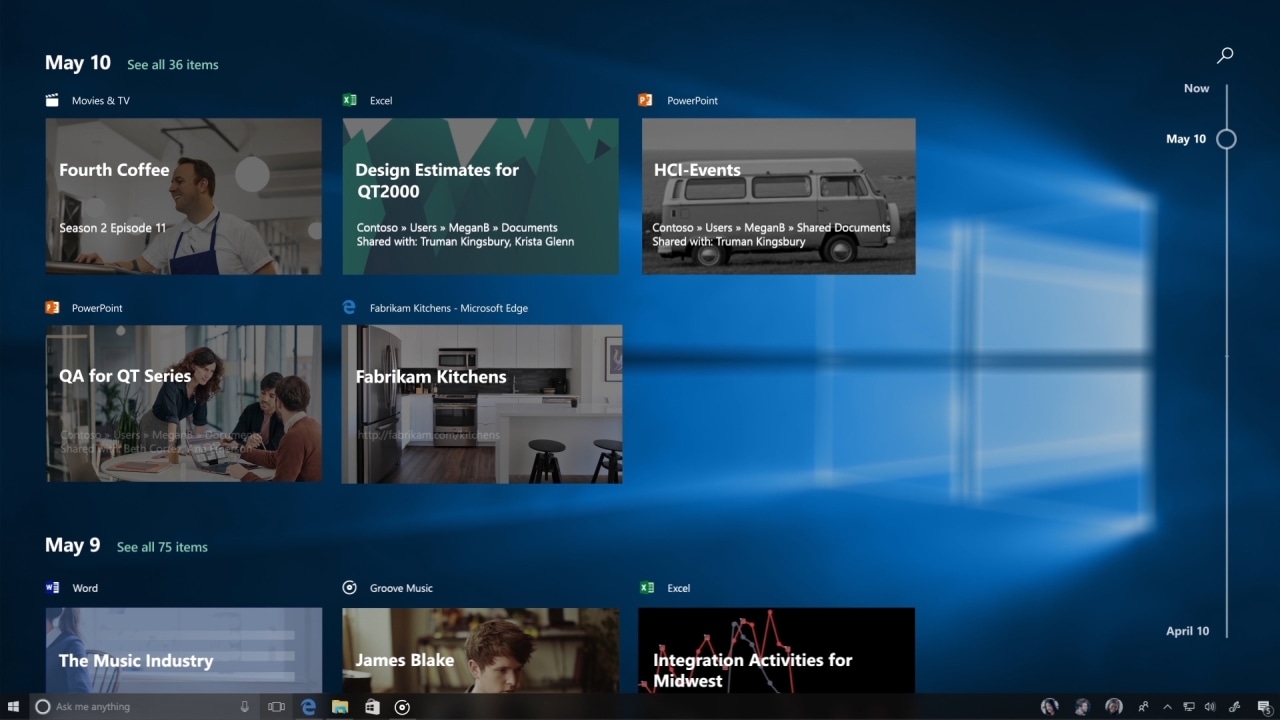 Image: Microsoft[/caption]The Slow ring, on the other hand, is for the testers who would want to test the feature after most of the bugs have been ironed out. Both these rings are part of the ‘Development Branch’.Windows ‘Sets’Myerson detailed that ‘Sets’ is Microsoft’s attempt to make it easier for users to organise their workflow and get back to it with as little effort as possible. The tabular interface that Microsoft is working on it not limited to tabs of that same program in the same Window. Instead, the tabs here are intelligent and flexible as users can open a different program in the same window without the need to juggle around different windows with all the different tabs opened.[caption id="attachment_4232853" align="alignnone" width="857"]
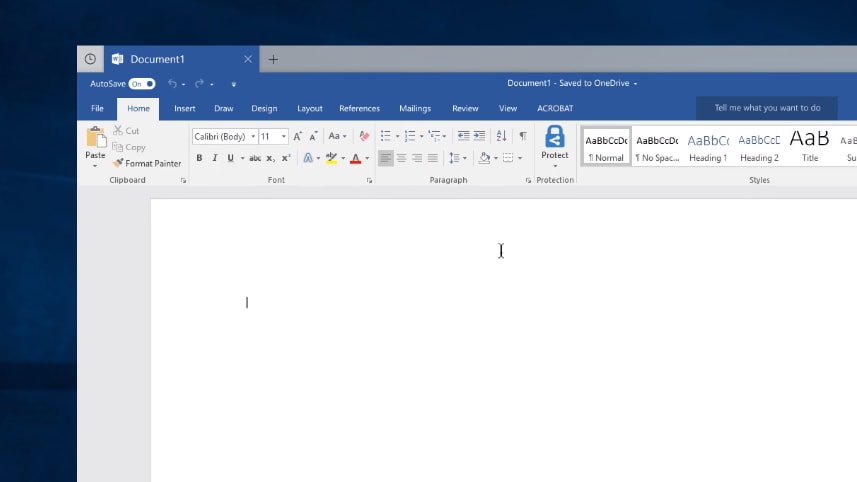 Image: YouTube/Windows[/caption][caption id="attachment_4232857" align="alignnone" width="1268"]
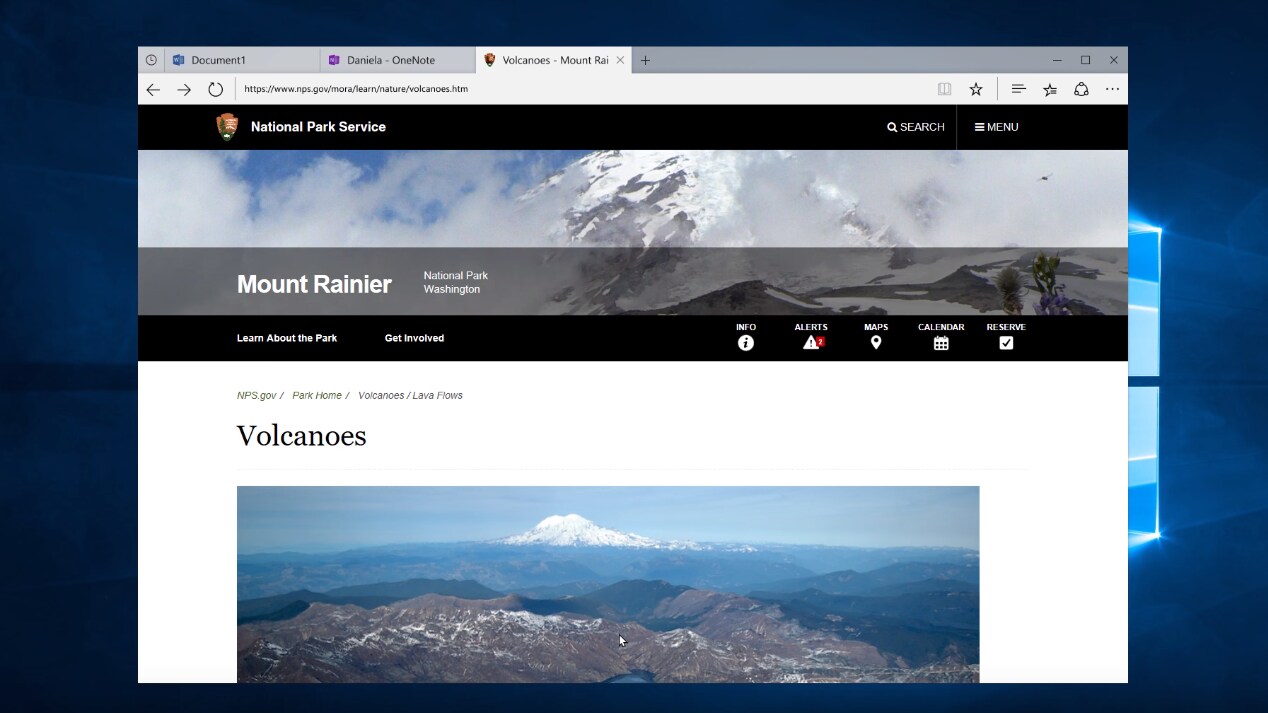 Image: YouTube/Windows[/caption]The primary reason for how this feature works is because Microsoft wants the feature to work in conjunction with Timeline so that the user can get back to whatever task they were working on without wasting time finding the different programs that were open at a particular point in the timeline.[caption id="attachment_4232855" align="alignnone" width="1276"]
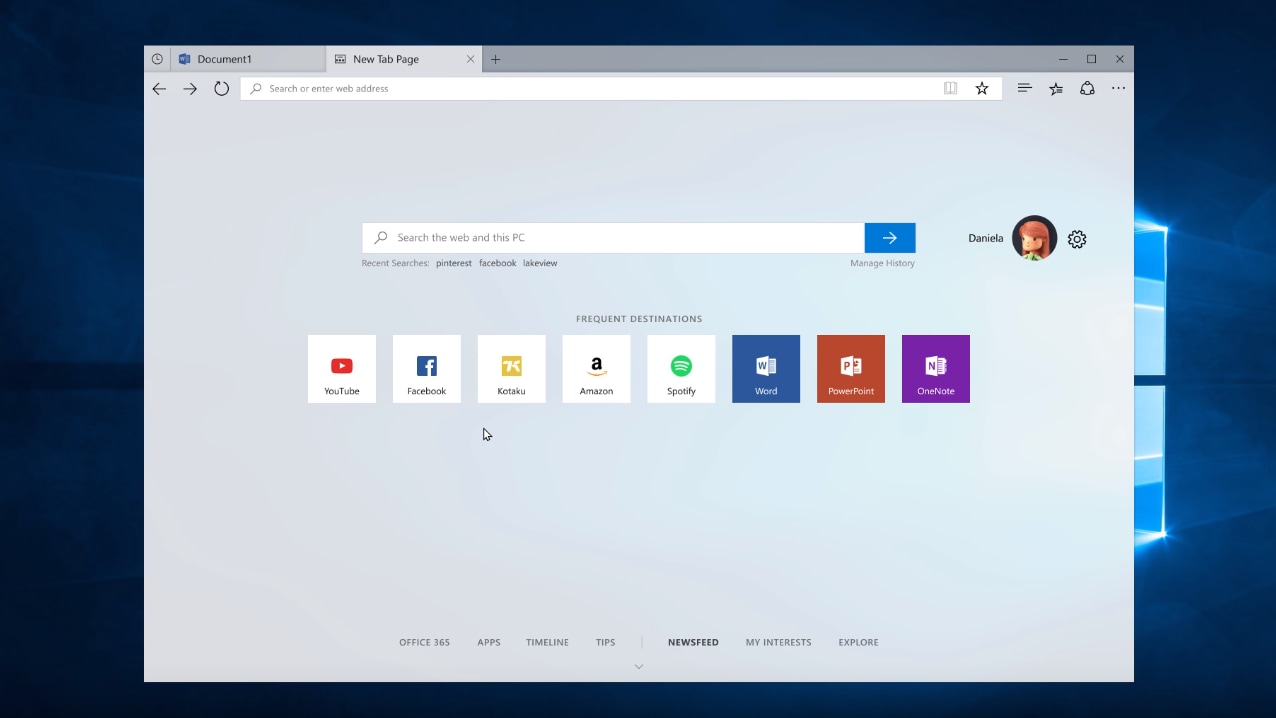 Image: YouTube/Windows[/caption][caption id="attachment_4232859" align="alignnone" width="620"]
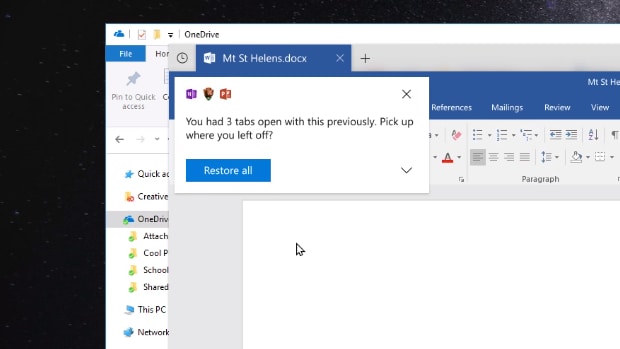 Image: YouTube/Windows[/caption]The interesting thing to note here is that Windows will remember all the different programs that were open at a particular time and will remind the user about the different programs if they happen to open one of the files from any recent ‘Set’. Terry admitted that ‘Sets’ is not the final name as the team has ‘not landed on a name yet’. The company posted a video about their vision of the feature and demoed a student working with Microsoft Office Word with Office 365, Microsoft Edge and Powerpoint.
First Published:Nov 29, 2017, 08:58:49 IST
Advertisement
Advertisement

Why AI notetakers are raising serious privacy and security concerns
AI notetakers promise effortless meeting summaries, but experts warn they could expose confidential conversations, corporate secrets and personal voiceprints. As businesses increasingly adopt AI-powered meeting assistants, questions over data storage, privacy, consent and legal risks are becoming impossible to ignore
5 min read
China's low-cost AI models are changing the global AI race. Here's why Silicon Valley is worried
As Chinese firms continue to improve performance while keeping prices low, the AI race is no longer just about building the smartest model—it is increasingly becoming a battle over who can deliver the best value
2 min read
China's Kimi K3 challenges US AI leaders with frontier-level performance at lower cost
Chinese artificial intelligence startup Moonshot AI has unveiled its latest open-weight AI model, Kimi K3, with early results suggesting it could compete with some of the world's most advanced AI systems developed by leading US companies
2 min read
How did Instagram run ads promoting child abuse in India?
India has issued a notice to Meta after an investigation alleged that Instagram displayed paid advertisements promoting child sexual abuse material. MeitY ordered Meta to remove such Instagram ads and explain within seven days how they were approved
8 min read
Why has India halted WhatsApp’s username feature before launch?
India has halted WhatsApp’s planned username feature, citing concerns about cybercrime, impersonation, and law enforcement challenges. As Meta races to address security concerns, here’s why MeitY has paused the rollout, what the feature does, and how it could influence privacy and online safety in India
3 min read
Advertisement
Advertisement