


Microsoft Edge gets Kids mode that brings kid-friendly content, custom browser themes and more
Users will have to choose the appropriate age from the options of 5-8 years and 9 and older as per preference.

Microsoft has introduced a Kids Mode on its Edge browser that is designed to offer Web browsing in a child-friendly, customisable manner. The new Kids Mode is currently available in the US, only on Windows and macOS. The Microsoft post says that the Kids Mode is designed with kid-friendly features and safety guardrails for kids to safely explore the web. The Kids Mode sets the Bing SafeSearch to ‘strict' by default and also offers other features like kid-friendly content, custom browser themes, and a password to exit.[caption id="attachment_9184611" align="alignnone" width="1280"] Microsoft will also allow parents to set an age limit in the Kids Mode, for instance, the 5-8 years selection would show strict Microsoft BingSearch[/caption]The Microsoft Edge users don't need to have a child account or profile to access Kids Mode.Microsoft will also allow parents to set an age limit in the Kids Mode, for instance, the 5-8 years selection would show strict Microsoft BingSearch, simplified browser and changeable themes, while the selection of 9 and older age would show more content for kids with security features like SafeSearch.[caption id="attachment_9315251" align="alignnone" width="404"]
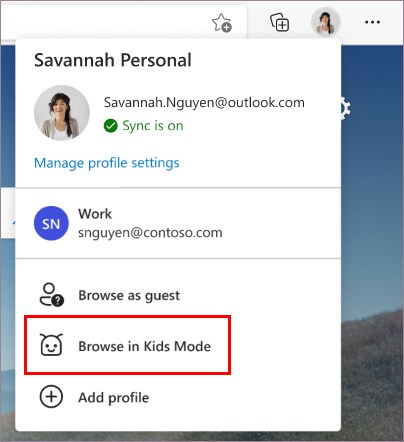 Kids mode on Microsoft Edge.[/caption]It is worth noting that the Kids Mode would stay open in the Edge browser until you exit the mode.For enabling Kids Mode on Microsoft Edge, users will be required to click on the profile icon on the top left corner of the search bar and select Browse in Kids Mode. Note that you don't need to sign in to access this option, however, signing in will allow the Kids Mode settings to sync across all your devices.Users will have to choose the appropriate age from the options of 5-8 years and 9 and older as per preference.To exit, users will have to click on the Kids Mode icon from the top of the browser and will be required to enter the password along with other credentials.The dedicated Kids mode will help parents keep their children safe online, for digital tools like entertainment and education.

Why AI notetakers are raising serious privacy and security concerns
China's low-cost AI models are changing the global AI race. Here's why Silicon Valley is worried
China's Kimi K3 challenges US AI leaders with frontier-level performance at lower cost
How did Instagram run ads promoting child abuse in India?
Why has India halted WhatsApp’s username feature before launch?