
Advertisement


Sections
Apple iOS 11.4 brings in new AirPlay 2 features, Messages in iCloud, HomePod stereo pairing and more just ahead of WWDC 2018
Apart from the regular bug fixes and improvements, there are three major additions to AirPlay 2, HomePod stereo pairing and Messages in iCloud.

Apple has just released the iOS 11.4 update and a lot of the new features pertain to the HomePod and the audio capabilities. Apart from the regular bug fixes and improvements, there are three major additions to AirPlay 2, HomePod stereo pairing and Messages in iCloud.[caption id="attachment_4487953" align="alignleft" width="380"]![HomePod will support stereo pairing with iOS 11.4]() HomePod will support stereo pairing with iOS 11.4[/caption]AirPlay 2 and multi-room audioThe updates on the AirPlay 2 will let you control your home audio system and AirPlay 2 enabled speakers, letting you play music on multiple AirPlay 2 supporting speakers in your house, in sync. To control these AirPlay 2 supporting features, you will have to head to the Control Centre, Lock Screen or AirPlay controls within the apps on iPhone or iPad. To cut a long story short, this particular feature is to do with multi-room audio. AirPlay 2 will also work with Apple TV. Apart from Apple's own HomePod, around 32 products from six brands will be compatible with AirPlay 2 as well."While listening to music, it’s as easy as selecting or unselecting where the music is playing in Control Center, or users can ask Siri to play music in any room, a group of rooms, or everywhere in the home," says the Apple release. Apple Music subscribers can also fire up Siri to play different songs in different rooms or the same song everywhere.HomePod stereo pairingThe other major update is the support for HomePod stereo pairing using your iPhone or iPad. If there is a pair of HomePods, the new update will let the HomePod pair automatically sense its location in the room and accordingly perform advanced beamforming for a wider soundstage. Unless you disable the updates in the Home app, HomePod will automatically update to support stereo pairs.Messages in iCloudMessages in iCloud is finally available on Apple devices as well. This will let you store your messages, photos, attachments in iCloud and every time you sign into a new Apple device, all your Messages will be synced as well.Similarly, when you delete Messages on one device, it will be synced across other devices as well, so that you don't have to repeat the process on each device. Your conversations will still remain end to end encrypted.[caption id="attachment_4488019" align="alignnone" width="1280"]
HomePod will support stereo pairing with iOS 11.4[/caption]AirPlay 2 and multi-room audioThe updates on the AirPlay 2 will let you control your home audio system and AirPlay 2 enabled speakers, letting you play music on multiple AirPlay 2 supporting speakers in your house, in sync. To control these AirPlay 2 supporting features, you will have to head to the Control Centre, Lock Screen or AirPlay controls within the apps on iPhone or iPad. To cut a long story short, this particular feature is to do with multi-room audio. AirPlay 2 will also work with Apple TV. Apart from Apple's own HomePod, around 32 products from six brands will be compatible with AirPlay 2 as well."While listening to music, it’s as easy as selecting or unselecting where the music is playing in Control Center, or users can ask Siri to play music in any room, a group of rooms, or everywhere in the home," says the Apple release. Apple Music subscribers can also fire up Siri to play different songs in different rooms or the same song everywhere.HomePod stereo pairingThe other major update is the support for HomePod stereo pairing using your iPhone or iPad. If there is a pair of HomePods, the new update will let the HomePod pair automatically sense its location in the room and accordingly perform advanced beamforming for a wider soundstage. Unless you disable the updates in the Home app, HomePod will automatically update to support stereo pairs.Messages in iCloudMessages in iCloud is finally available on Apple devices as well. This will let you store your messages, photos, attachments in iCloud and every time you sign into a new Apple device, all your Messages will be synced as well.Similarly, when you delete Messages on one device, it will be synced across other devices as well, so that you don't have to repeat the process on each device. Your conversations will still remain end to end encrypted.[caption id="attachment_4488019" align="alignnone" width="1280"]![Messages in iCloud. Image: Apple]() Messages in iCloud. Image: Apple[/caption]To turn on Messages in iCloud, you need to head to Settings > Apple ID [your name] > iCloud > Messages. You will need to have two-factor authentication enabled. On the Mac, you need to go to Messages app > Preferences and check 'Messages in iCloud' to turn it on. You will need to do these steps across all devices, for the syncing to work seamlessly. Messages will take up space on your iCloud, but this means, you don't need to have a lot of them on your end devices as they're stored in the cloud.Messages in iCloud and AirPlay 2 were both features that were announced at WWDC 2017 when the iOS 11 was launched.Bug fixes and improvementsApart from this Apple also released a whole range of bug fixes and improvements to iOS. These include
Messages in iCloud. Image: Apple[/caption]To turn on Messages in iCloud, you need to head to Settings > Apple ID [your name] > iCloud > Messages. You will need to have two-factor authentication enabled. On the Mac, you need to go to Messages app > Preferences and check 'Messages in iCloud' to turn it on. You will need to do these steps across all devices, for the syncing to work seamlessly. Messages will take up space on your iCloud, but this means, you don't need to have a lot of them on your end devices as they're stored in the cloud.Messages in iCloud and AirPlay 2 were both features that were announced at WWDC 2017 when the iOS 11 was launched.Bug fixes and improvementsApart from this Apple also released a whole range of bug fixes and improvements to iOS. These include
 HomePod will support stereo pairing with iOS 11.4[/caption]AirPlay 2 and multi-room audioThe updates on the AirPlay 2 will let you control your home audio system and AirPlay 2 enabled speakers, letting you play music on multiple AirPlay 2 supporting speakers in your house, in sync. To control these AirPlay 2 supporting features, you will have to head to the Control Centre, Lock Screen or AirPlay controls within the apps on iPhone or iPad. To cut a long story short, this particular feature is to do with multi-room audio. AirPlay 2 will also work with Apple TV. Apart from Apple's own HomePod, around 32 products from six brands will be compatible with AirPlay 2 as well."While listening to music, it’s as easy as selecting or unselecting where the music is playing in Control Center, or users can ask Siri to play music in any room, a group of rooms, or everywhere in the home," says the Apple release. Apple Music subscribers can also fire up Siri to play different songs in different rooms or the same song everywhere.HomePod stereo pairingThe other major update is the support for HomePod stereo pairing using your iPhone or iPad. If there is a pair of HomePods, the new update will let the HomePod pair automatically sense its location in the room and accordingly perform advanced beamforming for a wider soundstage. Unless you disable the updates in the Home app, HomePod will automatically update to support stereo pairs.Messages in iCloudMessages in iCloud is finally available on Apple devices as well. This will let you store your messages, photos, attachments in iCloud and every time you sign into a new Apple device, all your Messages will be synced as well.Similarly, when you delete Messages on one device, it will be synced across other devices as well, so that you don't have to repeat the process on each device. Your conversations will still remain end to end encrypted.[caption id="attachment_4488019" align="alignnone" width="1280"]
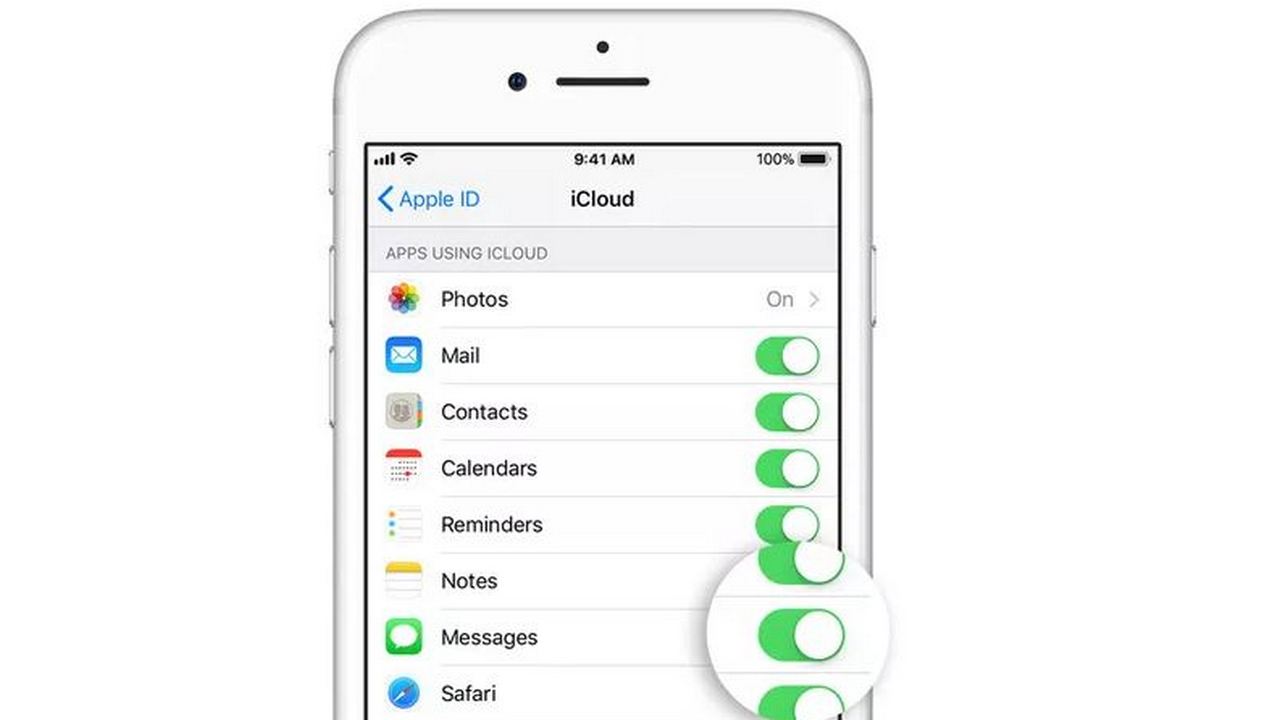 Messages in iCloud. Image: Apple[/caption]To turn on Messages in iCloud, you need to head to Settings > Apple ID [your name] > iCloud > Messages. You will need to have two-factor authentication enabled. On the Mac, you need to go to Messages app > Preferences and check 'Messages in iCloud' to turn it on. You will need to do these steps across all devices, for the syncing to work seamlessly. Messages will take up space on your iCloud, but this means, you don't need to have a lot of them on your end devices as they're stored in the cloud.Messages in iCloud and AirPlay 2 were both features that were announced at WWDC 2017 when the iOS 11 was launched.Bug fixes and improvementsApart from this Apple also released a whole range of bug fixes and improvements to iOS. These include
- Enabling teachers to assign students reading activities in iBooks using the Schoolwork app.
- Fixing an issue where certain character sequences could cause messages to crash.
- Addressing a Messages issue that can cause some messages to appear out of order.
- Addressing issues that deal with logging into Google Drive, Docs or Gmail on Safari.
- Fixing issues related to syncing Health data.
- Resolving issues that could cause an app to appear in an incorrect location on the Home screen.
- Fixing an issue where CarPlay audio could become distorted.
- Fixing an issue where selecting music from your iPhone could fail when playing music over Bluetooth or when connected to USB on some vehicles.
First Published:May 30, 2018, 11:15:17 IST
Advertisement
Advertisement

Why AI notetakers are raising serious privacy and security concerns
AI notetakers promise effortless meeting summaries, but experts warn they could expose confidential conversations, corporate secrets and personal voiceprints. As businesses increasingly adopt AI-powered meeting assistants, questions over data storage, privacy, consent and legal risks are becoming impossible to ignore
5 min read
China's low-cost AI models are changing the global AI race. Here's why Silicon Valley is worried
As Chinese firms continue to improve performance while keeping prices low, the AI race is no longer just about building the smartest model—it is increasingly becoming a battle over who can deliver the best value
2 min read
China's Kimi K3 challenges US AI leaders with frontier-level performance at lower cost
Chinese artificial intelligence startup Moonshot AI has unveiled its latest open-weight AI model, Kimi K3, with early results suggesting it could compete with some of the world's most advanced AI systems developed by leading US companies
2 min read
How did Instagram run ads promoting child abuse in India?
India has issued a notice to Meta after an investigation alleged that Instagram displayed paid advertisements promoting child sexual abuse material. MeitY ordered Meta to remove such Instagram ads and explain within seven days how they were approved
8 min read
Why has India halted WhatsApp’s username feature before launch?
India has halted WhatsApp’s planned username feature, citing concerns about cybercrime, impersonation, and law enforcement challenges. As Meta races to address security concerns, here’s why MeitY has paused the rollout, what the feature does, and how it could influence privacy and online safety in India
3 min read
Advertisement
Advertisement