
Advertisement


Sections
Want to turn off the always-on display in iPhone 14 Pro & iPhone 14 Pro Max? Learn details here
The iPhone 14 Pro and Pro Max come with Apple's Always On Display turned on by default, but it's not constantly active.

Apple has finally made the always-on display available on the new iPhone 14 Pro and iPhone 14 Pro Max. If you've ever used a modern Android smartphone, you are likely familiar with the always-on display and are aware of its value. But in the world of iPhones, this is a brand new feature that is accessible in the premium segments of the 14 series.![Want to turn off the always-on display in iPhone 14 Pro & iPhone 14 Pro Max Learn details here]()
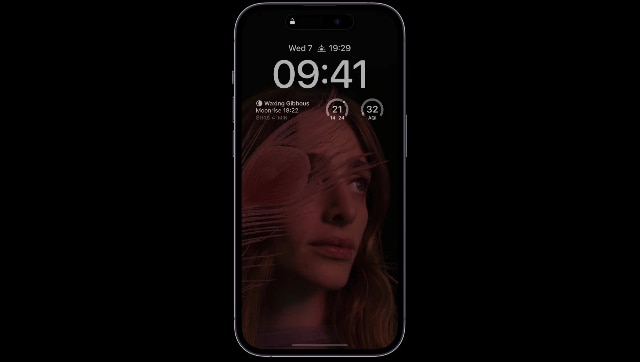
Of course, Apple is coming with it a little bit differently than the rest of the companies. The date, time, and notifications can all be seen on a phone screen even when it's locked and lying on a table. Typically, only the most crucial portions of your display are left on.The iPhone 14 Pro and Pro Max come with Apple's Always On Display switched on by default, but it's not constantly active. According to Apple's support page, the capability gets automatically turned off in a number of scenes to conserve battery life. The display turns completely dark on these eight different occasions mentioned below:
- When the iPhone screen is lying facing down.
- When the iPhone is kept in the purse or pocket.
- When the iPhone is linked to CarPlay
- When the user is using the Continuity Camera,
- When the phone is in idle mode
- When an alarm or sleep schedule is set, or the Sleep Focus or Low Power mode is activated by the user.
- When the Apple Watch is linked with the iPhone and the user is far from the range.
- Launch the ‘Settings’ app on your iPhone 14 Pro and iPhone 14 Pro Max.
- From the menu, go to the ‘Display and Brightness’ section.
- Scroll down to find the option that reads, ‘Always-on.’
- Toggle the ‘Always-on’ option as per your choice.
First Published:Sep 20, 2022, 08:57:10 IST
Advertisement
Advertisement

China’s gaming crackdown causes top 3 companies $80 bn market value loss, Tencent alone sheds $50 bn
The top three publicly listed game development and publishing studios, lost as much as $80 billion in market value, with Tencent alone shedding over $50 billion. Tencent saw its value slip by 16%, NetEase by 28 per cent, whereas Bilibili took a 14 per cent dive
What is Lensa AI and how to use the app to generate AI avatars?
You need to pay an annual subscription fee of Rs 2,499 for accessing all the features of Lensa AI.
What is Bluebugging and how do hackers use it? Learn how to secure your devices
Bluebugging attacks take advantage of Bluetooth-enabled devices. Once hacked, the attacker may modify or seize your contacts, perform and monitor conversations, read and send messages, and more.
WhatsApp to roll out ‘Message Yourself’ feature for Android and iOS users; check how you can access it
Wondering how to set up the "Message yourself"feature on WhatsApp? Users will first have to update the WhatsApp application on their smartphone in order to access the WhatsApp Message Yourself feature.
Astronomy watch face on Apple Watch enables exciting view of Solar System; check features here
The Astronomy watch face's default image of Earth includes a live cloud map that shows where you are right now.
Advertisement
Advertisement