
Advertisement


Sections
The Apple MacBook lineup is flawed and its ecosystem is confusing: Does Jony Ive's return herald a fix?
The amount of confusion around specifications, #DongleLife and more have created a messy ecosystem that’s so unlike Apple, it’s hard to believe it exists.

Buying a MacBook in 2017 shouldn’t be this hard. The amount of confusion around specifications, hardware options (to TouchBar or not to TouchBar), #DongleLife and more have created a messy ecosystem that’s so unlike Apple, it’s hard to believe it exists.[caption id="attachment_4256163" align="alignleft" width="380"]![Image: Apple]() Image: Apple[/caption]I’ve been using a 2014 MacBook Pro for a few years now. It’s a serviceable laptop that’s still going strong. Its aluminium shell is still pristine, that Retina Display is still as gorgeous as ever and I’ve all the ports I could ever need. The device is showing its age now, however, and while I want a new MacBook, the upgrade path is just too complicated.Till 2015, the choice of MacBook was easy. If you were on a budget, you bought a MacBook Air. If you wanted something more powerful, you simply bought a Pro in either the 13-inch or 15-inch variant, customised to your liking. If you felt like it, you could even manually upgrade your storage. If you were invested in the Apple ecosystem, everything would just work.Fast forward to 2017, and the options couldn’t be more confusing.[caption id="attachment_4255835" align="alignnone" width="1280"]
Image: Apple[/caption]I’ve been using a 2014 MacBook Pro for a few years now. It’s a serviceable laptop that’s still going strong. Its aluminium shell is still pristine, that Retina Display is still as gorgeous as ever and I’ve all the ports I could ever need. The device is showing its age now, however, and while I want a new MacBook, the upgrade path is just too complicated.Till 2015, the choice of MacBook was easy. If you were on a budget, you bought a MacBook Air. If you wanted something more powerful, you simply bought a Pro in either the 13-inch or 15-inch variant, customised to your liking. If you felt like it, you could even manually upgrade your storage. If you were invested in the Apple ecosystem, everything would just work.Fast forward to 2017, and the options couldn’t be more confusing.[caption id="attachment_4255835" align="alignnone" width="1280"]![From left to right, you get a crippled laptop, 3-generations old hardware, an unusable base model and an unnecessarily expensive monster]() From left to right, you get a crippled laptop, 3-generations old hardware with an ancient display, an underpowered 'pro' model and an unnecessarily expensive monster[/caption]Display: Sizes and standardsIn 2017, there are four display options to choose from. You can go a non-retina 13-inch display on the MacBook Air, a 12-inch Retina display with a standard colour gamut (100 percent sRGB, 70 percent P3) and either a 13-inch or 15-inch display on a MacBook Pro, which supports wide colour gamuts (100 percent P3).Why is Apple offering a non-retina display in 2017 and why aren’t all the displays P3-compatible? I’ve no idea.[caption id="attachment_4255861" align="alignnone" width="1280"]
From left to right, you get a crippled laptop, 3-generations old hardware with an ancient display, an underpowered 'pro' model and an unnecessarily expensive monster[/caption]Display: Sizes and standardsIn 2017, there are four display options to choose from. You can go a non-retina 13-inch display on the MacBook Air, a 12-inch Retina display with a standard colour gamut (100 percent sRGB, 70 percent P3) and either a 13-inch or 15-inch display on a MacBook Pro, which supports wide colour gamuts (100 percent P3).Why is Apple offering a non-retina display in 2017 and why aren’t all the displays P3-compatible? I’ve no idea.[caption id="attachment_4255861" align="alignnone" width="1280"]![The triangles represent the volume of colour shown by a standard display (sRGB) and a wide gamut display (P3).]() The triangles represent the volume of colour shown by a standard display (sRGB) and a wide gamut display (P3). Apple's Pro MacBooks are P3-compliant and the 12-inch MacBook is only rated for sRGB. Image: Astramael[/caption]What’s P3? In layman’s terms, a P3-compliant display can display about 40 percent more colours than a regular display. Reds, greens, blues, they’ll all be more vivid and you’ll notice less colour banding in images.USB-C: USB-ConfusionThe biggest highlight/controversy related to Apple’s new MacBooks is that they all support USB-C. Apple’s been preaching the benefits of USB-C since they introduced it to the MacBook in 2014, and I don’t think the company appreciates how complicated they’ve now made life for everyone.The biggest confusion for everyone, something that Apple doesn’t clarify, is that USB-C only refers to the shape of the connector, not its capabilities.[caption id="attachment_4255959" align="alignnone" width="1280"]
The triangles represent the volume of colour shown by a standard display (sRGB) and a wide gamut display (P3). Apple's Pro MacBooks are P3-compliant and the 12-inch MacBook is only rated for sRGB. Image: Astramael[/caption]What’s P3? In layman’s terms, a P3-compliant display can display about 40 percent more colours than a regular display. Reds, greens, blues, they’ll all be more vivid and you’ll notice less colour banding in images.USB-C: USB-ConfusionThe biggest highlight/controversy related to Apple’s new MacBooks is that they all support USB-C. Apple’s been preaching the benefits of USB-C since they introduced it to the MacBook in 2014, and I don’t think the company appreciates how complicated they’ve now made life for everyone.The biggest confusion for everyone, something that Apple doesn’t clarify, is that USB-C only refers to the shape of the connector, not its capabilities.[caption id="attachment_4255959" align="alignnone" width="1280"]![USB-C isn't the saviour of the human race. The 'C' only refers to the shape of the connector.]() USB-C isn't the saviour of the human race. The 'C' only refers to the shape of the connector.[/caption]To put it simply, not all USB-C is created equal. While the USB-C standard does allow for a single cable that can do everything (connect to an external display or GPU, deliver adequate power, transmit files at blazing fast speeds, etc.), only a handful of cables and ports do that.Apple’s cheapest laptop, the MacBook Air 13, doesn’t include USB-C. The 12-inch MacBook includes a USB-C port, but it’s only USB 3.1 Gen1-compliant, which is the same as USB 3.0 on a regular laptop like the Air or the older MacBook Pros. Given this limitation, it’s hard to fathom why Apple has restricted the MacBook to a single USB port.The 13-inch MacBook Pro without a TouchBar offers two USB-C ports, and these fully support the Thunderbolt 3 spec. However, having only two ports is still limiting (I have eight ports on my aging MacBook Pro 13). When it comes to connectivity, less can never be more.
USB-C isn't the saviour of the human race. The 'C' only refers to the shape of the connector.[/caption]To put it simply, not all USB-C is created equal. While the USB-C standard does allow for a single cable that can do everything (connect to an external display or GPU, deliver adequate power, transmit files at blazing fast speeds, etc.), only a handful of cables and ports do that.Apple’s cheapest laptop, the MacBook Air 13, doesn’t include USB-C. The 12-inch MacBook includes a USB-C port, but it’s only USB 3.1 Gen1-compliant, which is the same as USB 3.0 on a regular laptop like the Air or the older MacBook Pros. Given this limitation, it’s hard to fathom why Apple has restricted the MacBook to a single USB port.The 13-inch MacBook Pro without a TouchBar offers two USB-C ports, and these fully support the Thunderbolt 3 spec. However, having only two ports is still limiting (I have eight ports on my aging MacBook Pro 13). When it comes to connectivity, less can never be more.
The 13-inch and 15-inch MacBook Pros with a TouchBar include four USB-C ports, but only two are fully Thunderbolt 3 compliant (40 Gbps), while the other two operate at half the speed (20 Gbps). For the average user, this isn’t significant. For a power user, a ‘pro’ if you will, it is.Irritatingly, Apple doesn’t bundle a Thunderbolt 3 compliant cable with any of its MacBooks, so a complaint cable is another additional purchase. The cable it bundles is simply a charging cable supports USB 2.0 speeds (480 Mbps). The USB 2.0 standard was laid down almost 20 years ago. Today, even Wi-Fi is faster.The biggest nuisance with this new regime is that none of your Apple cables and dongles will connect to your MacBook, and this includes your iPhone. The convenience of charging your phone from your MacBook is no more without a $19 or $29 dongle.Which very nicely brings me to the next point, #DongleLife.#DongleLife: Universally inconvenientMy personal and professional work requires that I take photos and videos and edit them on the go. The new MacBooks make this incredibly inconvenient without a handful of dongles.Earlier, I could simply take pictures with my camera, transfer the images and start editing. It was also convenient to plug my iPhone into the MacBook while I worked so I could charge it, export video clips, etc.At work, I simply plug in my keyboard, mouse and HDMI cable into the Mac and start using it as a proper desktop.With the new MacBooks, I’ll need dongles for everything.For my use, Apple’s store suggests the following:![Sir Jonathan Ive to the rescue. Image: Apple]() Sir Jonathan Ive to the rescue. Image: Apple[/caption]In a recent interview, Sir Jony Ive, Apple's chief designer, gave a tiny little hint that change is in the offing, offering a modicum of hope to depressed Apple MacBook users and fans alike. Ive, the man who's behind almost all of Apple's most iconic products, will finally return and take charge of Apple's design team. Ive was on a hiatus for two years, focussing his energies on completing Apple Park, Apple's sprawling new campus.All of this is underscored by Ive's remarks on the feedback on the 2016 and 2017 MacBook Pros: "All of your feelings about the MacBook that you use, we hear. And boy do we hear."Considering that it was under Ive's leadership that we saw Apple's last great MacBook (in 2015), it's safe to assume that there is some hope for the future.
Sir Jonathan Ive to the rescue. Image: Apple[/caption]In a recent interview, Sir Jony Ive, Apple's chief designer, gave a tiny little hint that change is in the offing, offering a modicum of hope to depressed Apple MacBook users and fans alike. Ive, the man who's behind almost all of Apple's most iconic products, will finally return and take charge of Apple's design team. Ive was on a hiatus for two years, focussing his energies on completing Apple Park, Apple's sprawling new campus.All of this is underscored by Ive's remarks on the feedback on the 2016 and 2017 MacBook Pros: "All of your feelings about the MacBook that you use, we hear. And boy do we hear."Considering that it was under Ive's leadership that we saw Apple's last great MacBook (in 2015), it's safe to assume that there is some hope for the future.
 Image: Apple[/caption]I’ve been using a 2014 MacBook Pro for a few years now. It’s a serviceable laptop that’s still going strong. Its aluminium shell is still pristine, that Retina Display is still as gorgeous as ever and I’ve all the ports I could ever need. The device is showing its age now, however, and while I want a new MacBook, the upgrade path is just too complicated.Till 2015, the choice of MacBook was easy. If you were on a budget, you bought a MacBook Air. If you wanted something more powerful, you simply bought a Pro in either the 13-inch or 15-inch variant, customised to your liking. If you felt like it, you could even manually upgrade your storage. If you were invested in the Apple ecosystem, everything would just work.Fast forward to 2017, and the options couldn’t be more confusing.[caption id="attachment_4255835" align="alignnone" width="1280"]
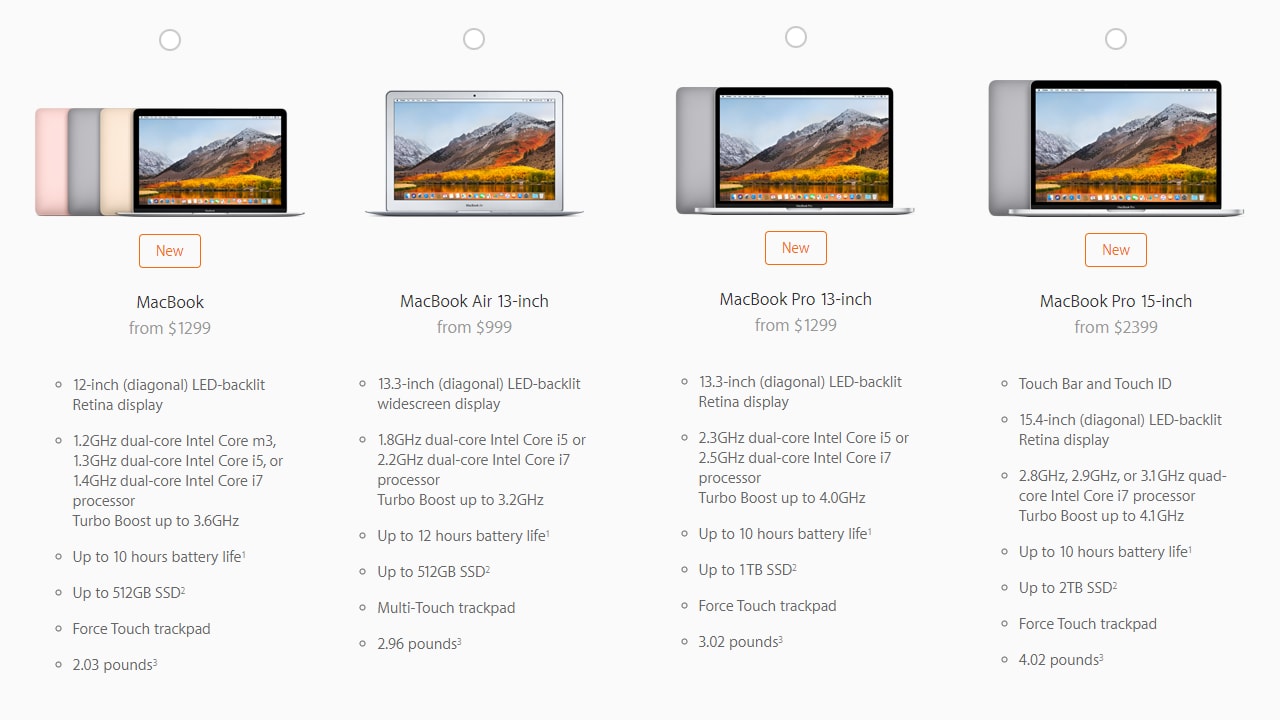 From left to right, you get a crippled laptop, 3-generations old hardware with an ancient display, an underpowered 'pro' model and an unnecessarily expensive monster[/caption]Display: Sizes and standardsIn 2017, there are four display options to choose from. You can go a non-retina 13-inch display on the MacBook Air, a 12-inch Retina display with a standard colour gamut (100 percent sRGB, 70 percent P3) and either a 13-inch or 15-inch display on a MacBook Pro, which supports wide colour gamuts (100 percent P3).Why is Apple offering a non-retina display in 2017 and why aren’t all the displays P3-compatible? I’ve no idea.[caption id="attachment_4255861" align="alignnone" width="1280"]
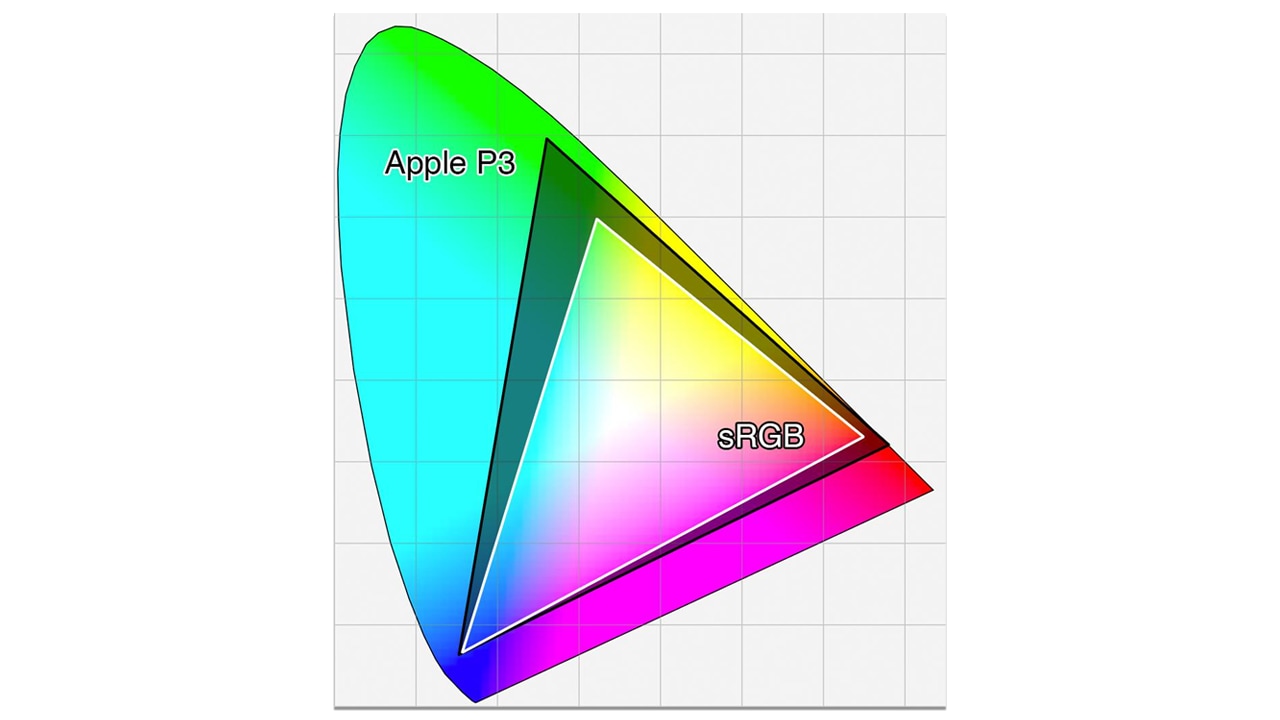 The triangles represent the volume of colour shown by a standard display (sRGB) and a wide gamut display (P3). Apple's Pro MacBooks are P3-compliant and the 12-inch MacBook is only rated for sRGB. Image: Astramael[/caption]What’s P3? In layman’s terms, a P3-compliant display can display about 40 percent more colours than a regular display. Reds, greens, blues, they’ll all be more vivid and you’ll notice less colour banding in images.USB-C: USB-ConfusionThe biggest highlight/controversy related to Apple’s new MacBooks is that they all support USB-C. Apple’s been preaching the benefits of USB-C since they introduced it to the MacBook in 2014, and I don’t think the company appreciates how complicated they’ve now made life for everyone.The biggest confusion for everyone, something that Apple doesn’t clarify, is that USB-C only refers to the shape of the connector, not its capabilities.[caption id="attachment_4255959" align="alignnone" width="1280"]
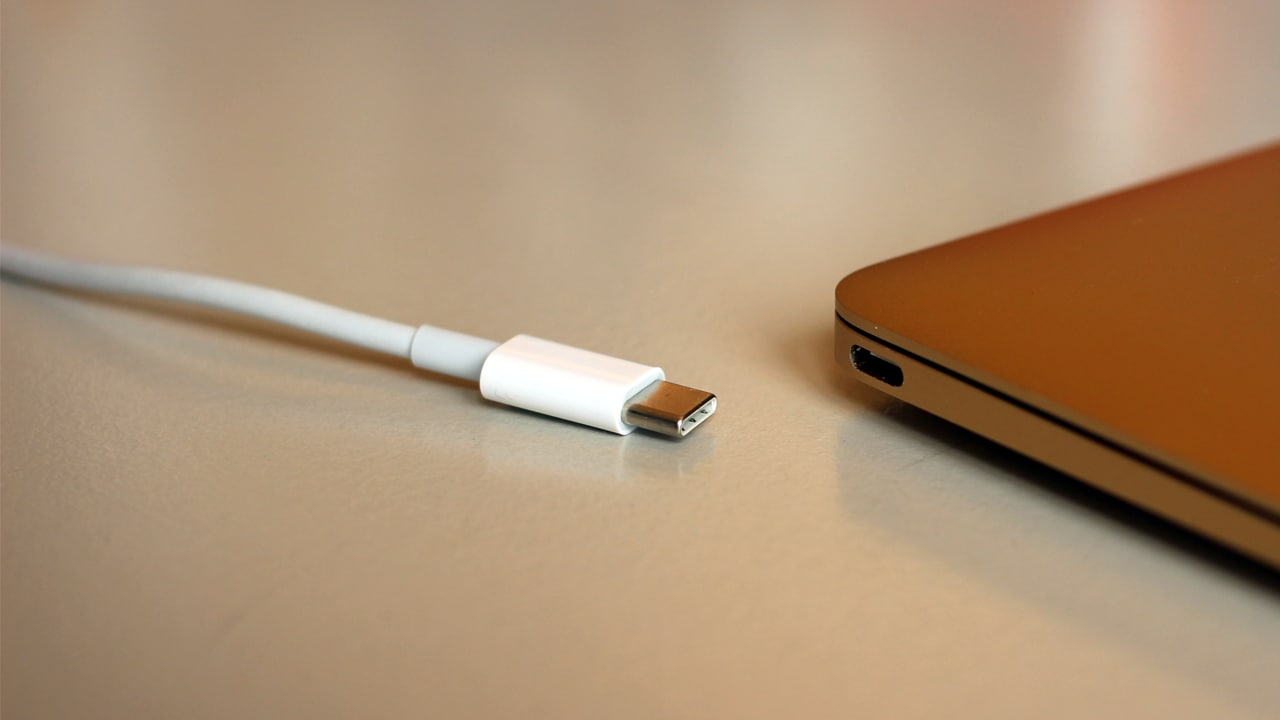 USB-C isn't the saviour of the human race. The 'C' only refers to the shape of the connector.[/caption]To put it simply, not all USB-C is created equal. While the USB-C standard does allow for a single cable that can do everything (connect to an external display or GPU, deliver adequate power, transmit files at blazing fast speeds, etc.), only a handful of cables and ports do that.Apple’s cheapest laptop, the MacBook Air 13, doesn’t include USB-C. The 12-inch MacBook includes a USB-C port, but it’s only USB 3.1 Gen1-compliant, which is the same as USB 3.0 on a regular laptop like the Air or the older MacBook Pros. Given this limitation, it’s hard to fathom why Apple has restricted the MacBook to a single USB port.The 13-inch MacBook Pro without a TouchBar offers two USB-C ports, and these fully support the Thunderbolt 3 spec. However, having only two ports is still limiting (I have eight ports on my aging MacBook Pro 13). When it comes to connectivity, less can never be more.
| MacBook Air | MacBook | NTB MacBook Pro 13 | TB MacBook Pro 13/15 | 2014 MacBook Pro 13 | |
| USB-A ports | 2 | NA | NA | NA | 2 |
| USB-C ports | NA | 1 | 2 | 4 | 4 |
| SD Card reader | 1 | NA | NA | NA | 1 |
| HDMI out | NA | NA | NA | NA | 1 |
| 3.5 mm audio jack | 1 | 1 | 1 | 1 | 1 |
| MagSafe | 1 | NA | NA | NA | 1 |
| Data transfer speed (Gbps) | 5 | 5 | 40 | 40/20 | 5/20 (Thunderbolt 2) |
| Total no. of ports | 6 | 1 | 2 | 4 | 8 |
- Apple USB-C Digital AV Multiport Adapter ($69): This offers USB-C power pass-through, 1x HDMI 1.4b (4K@30Hz max), 1x USB 3.0.
- Apple USB-C to Lightning Cable ($25): For connecting and charging my iPhone and literally nothing else.
- Apple USB-C to USB-A adapter ($19): For any additional USB-A devices.
- SanDisk Extreme Pro SD UHS-II Card USB-C Reader ($49.95): For transferring images and video from a high-speed SD card.
 Sir Jonathan Ive to the rescue. Image: Apple[/caption]In a recent interview, Sir Jony Ive, Apple's chief designer, gave a tiny little hint that change is in the offing, offering a modicum of hope to depressed Apple MacBook users and fans alike. Ive, the man who's behind almost all of Apple's most iconic products, will finally return and take charge of Apple's design team. Ive was on a hiatus for two years, focussing his energies on completing Apple Park, Apple's sprawling new campus.All of this is underscored by Ive's remarks on the feedback on the 2016 and 2017 MacBook Pros: "All of your feelings about the MacBook that you use, we hear. And boy do we hear."Considering that it was under Ive's leadership that we saw Apple's last great MacBook (in 2015), it's safe to assume that there is some hope for the future.
First Published:Dec 13, 2017, 16:21:50 IST
Advertisement
Advertisement

Why AI notetakers are raising serious privacy and security concerns
AI notetakers promise effortless meeting summaries, but experts warn they could expose confidential conversations, corporate secrets and personal voiceprints. As businesses increasingly adopt AI-powered meeting assistants, questions over data storage, privacy, consent and legal risks are becoming impossible to ignore
5 min read
China's low-cost AI models are changing the global AI race. Here's why Silicon Valley is worried
As Chinese firms continue to improve performance while keeping prices low, the AI race is no longer just about building the smartest model—it is increasingly becoming a battle over who can deliver the best value
2 min read
China's Kimi K3 challenges US AI leaders with frontier-level performance at lower cost
Chinese artificial intelligence startup Moonshot AI has unveiled its latest open-weight AI model, Kimi K3, with early results suggesting it could compete with some of the world's most advanced AI systems developed by leading US companies
2 min read
How did Instagram run ads promoting child abuse in India?
India has issued a notice to Meta after an investigation alleged that Instagram displayed paid advertisements promoting child sexual abuse material. MeitY ordered Meta to remove such Instagram ads and explain within seven days how they were approved
8 min read
Why has India halted WhatsApp’s username feature before launch?
India has halted WhatsApp’s planned username feature, citing concerns about cybercrime, impersonation, and law enforcement challenges. As Meta races to address security concerns, here’s why MeitY has paused the rollout, what the feature does, and how it could influence privacy and online safety in India
3 min read
Advertisement
Advertisement