


Narendra Modi launches all-in-one UMANG app at Global Conference on Cyberspace: Here's what it can do for you
The UMANG app has three section on the top that includes Home, Favorite, All Services and a list of States to choose from for the services provided by a particular state.

Indian Prime Minister Narendra Modi has launched a unified platform app for digital access to various government services. UMANG (Unified Mobile Application for New-age Governance) app was launched at the fifth edition of the Global Conference on Cyberspace on 23 November in New Delhi. The app is available for both platforms Google Play Store and Apple Store for free.[caption id="attachment_4224845" align="alignleft" width="380"] UMANG app logo. Google Play store[/caption]The app is focused on making e-governance 'mobile first' in India and includes access to various e-services provided by the different levels of government across the country. The services provided by Central, State, local bodies, and agencies of the government on platforms including app, web, SMS, and IVR channels have been included in the app.Few of the features of the app are integration with Digital India services such as Aadhaar, DigiLocker, and PayGov.According to the description provided on the Google Play Store, any new service will automatically be included in the app. The app also allows the users to discover, download, access and use all government services easily in one place all from the comfort of you mobile phone.The data taken from the app is saved in encrypted format. Popular services available on the app are My Pan for queries related to PAN, NPS (National Pension System), PMKVY ( Pradhan Mantri Kaushal Vikas Yojna), AICTE, CBSE, Passport Seva and more.[caption id="attachment_4224843" align="alignnone" width="1024"]
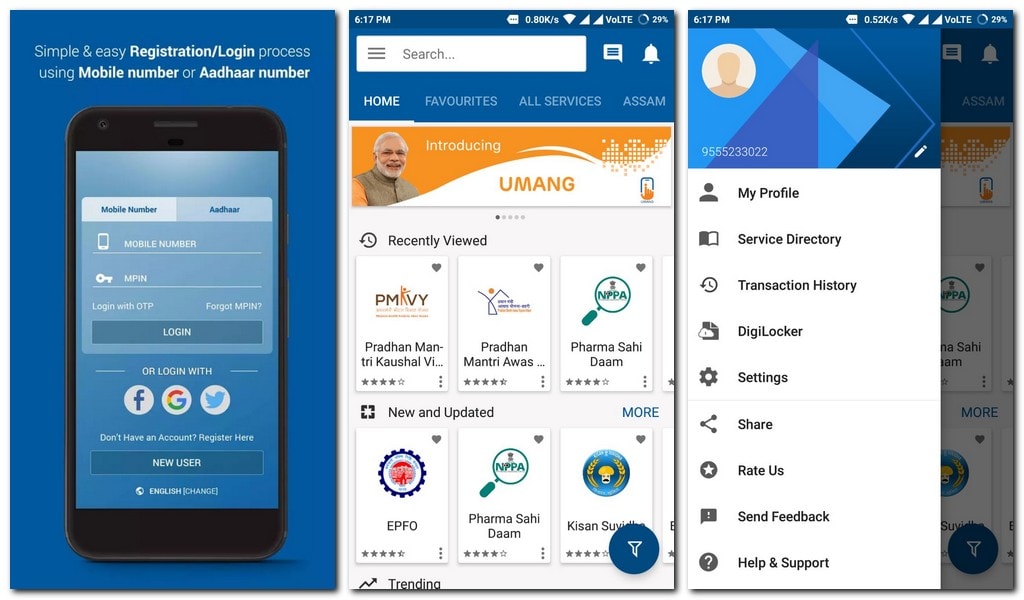 UMANG app Screenshot.[/caption]The home page of the app displays your recently viewed services, new services and the recently updated services as well. There's also a trending services section and top rated services along with suggested services. The UMANG app has three sections on the top that includes Home, Favorite (shows marked favorite services), All Services (further includes Central and State section) and a list of States to choose from, for the services provided by a particular state. The notification and help tabs lie on the top right of the Home page of the app.Top left app has a three bar button that takes the user to another section that includes Profile setting, Service Dictionary, Transaction History , DigiLocker and Settings of the app. A new user can register on the app be entering his/her mobile number or linking the app with their Aadhaar details.

Why AI notetakers are raising serious privacy and security concerns
China's low-cost AI models are changing the global AI race. Here's why Silicon Valley is worried
China's Kimi K3 challenges US AI leaders with frontier-level performance at lower cost
How did Instagram run ads promoting child abuse in India?
Why has India halted WhatsApp’s username feature before launch?