
Advertisement


Sections
Here are 6 alternatives to Apple's Memoji helping you create your virtual avatar
These apps create your animated, virtual avatar on iPhones as well as Android.

Apple iOS 12 has rolled out and has brought in the evolution of the Animoji feature, the engineering marvel called*drumroll* Memoji!But it has left us normal folks wondering as to how we can put our face on such a cool technology without selling our kidneys as it's only available in the iPhone X and above series.Animoji was first introduced with the launch of the iPhone X which would let the phone map your facial features to that of an animal like a dog, teddy bear and so forth.The arrival of Memoji has upped the narcissism game as now you can make stickers or emojis of yourself. To know more about Memoji you can click here.Memoji gives a wonderful blend of the software and hardware configuration, as it uses the True Depth Camera which gives out a detailed and accurate representation of your avatar in comparison to its counterparts such as AR-emoji on Samsung.So here are 6 apps that try to give a personal touch to your virtual world by helping you create your own animated, virtual avatar on iPhones and Android.P.S They won't look exactly like the Memoji but are you willing to spend a lakh for making a virtual avatar of yourself? Hah! Thought as much![caption id="attachment_5227771" align="alignnone" width="1280"]![Virtual avatars on Bitmoji and Gboard Minis respectively. Image: Tech2]() Virtual avatars on Bitmoji (L) and Gboard Minis (R). Image: Tech2[/caption]1) BitmojiBitmoji is a standalone app. The avatar that you create by using the apps acts like your personal emoji. It's basically your virtual avatar as an emoji or a sticker. That means it is static and it does not track your face.Your Bitmoji app can be linked to your Snapchat account.It uses the selfie camera of your phone and allows you to customise a complete avatar as per what you see yourself as.Starting from choosing your hair colour, your face structure to which dress you want your avatar to wear, everything can be chosen with a tap of your finger. The app has added some new clothing options as well.The avatar tries to represent the features that you've chosen in an animated way, but it still tries to keep the Bitmoji close to reality.You can go to your settings and opt for giving the app complete access to your keyboard so whenever you choose to send your personalised sticker, your Bitmoji will pop up on your keyboard.This works on third-party applications as well for example WhatsApp.You can also create Bitmoji's with two people by choosing your friend from the Snapchat contact list.2) Gboard MinisGboard minis is a part of the G Board application. So if you wish to create your own Gboard Mini you'll need to download the Gboard app. After opening the app you'd have to make the app as your default keyboard for it to function.Also, the app would need the permission to gain access to your camera.Like Bitmoji it too creates your virtual avatar in a sticker form.The app gives two types of face emojis: bold emoji and sweet mini.You can choose the stickers section from the keyboard and then find the Mini tab there which looks like a weird shape figure face and create your own mini avatar.The drill remains the same, tap the selfie button, open your selfie camera, take a selfie and your journey to create your own virtual avatar starts there.[caption id="attachment_5227761" align="alignnone" width="1280"]
Virtual avatars on Bitmoji (L) and Gboard Minis (R). Image: Tech2[/caption]1) BitmojiBitmoji is a standalone app. The avatar that you create by using the apps acts like your personal emoji. It's basically your virtual avatar as an emoji or a sticker. That means it is static and it does not track your face.Your Bitmoji app can be linked to your Snapchat account.It uses the selfie camera of your phone and allows you to customise a complete avatar as per what you see yourself as.Starting from choosing your hair colour, your face structure to which dress you want your avatar to wear, everything can be chosen with a tap of your finger. The app has added some new clothing options as well.The avatar tries to represent the features that you've chosen in an animated way, but it still tries to keep the Bitmoji close to reality.You can go to your settings and opt for giving the app complete access to your keyboard so whenever you choose to send your personalised sticker, your Bitmoji will pop up on your keyboard.This works on third-party applications as well for example WhatsApp.You can also create Bitmoji's with two people by choosing your friend from the Snapchat contact list.2) Gboard MinisGboard minis is a part of the G Board application. So if you wish to create your own Gboard Mini you'll need to download the Gboard app. After opening the app you'd have to make the app as your default keyboard for it to function.Also, the app would need the permission to gain access to your camera.Like Bitmoji it too creates your virtual avatar in a sticker form.The app gives two types of face emojis: bold emoji and sweet mini.You can choose the stickers section from the keyboard and then find the Mini tab there which looks like a weird shape figure face and create your own mini avatar.The drill remains the same, tap the selfie button, open your selfie camera, take a selfie and your journey to create your own virtual avatar starts there.[caption id="attachment_5227761" align="alignnone" width="1280"]![Filters used on Facebook, MSQRD and Instagram respectively. Image: Tech2]() Filters used on Facebook, MSQRD and Instagram respectively. Image: Tech2[/caption]3) Facebook and InstagramFacebook and Instagram come with a ton of filters to animate your virtual avatar. They aren't static and are filled with creative elements.Even though both of them have basically copied Snapchat, they offer filters which are dynamic and even have some which represent the festivals, seasons, that is taking place at that moment.These filters are engaging and also offer a lot of variety.You can choose from a number of filters like having moving cat whiskers on your face to having a dinosaur in your room.The unique thing about it is every time you choose a different filter you can also see the name of the creator by whom the sticker has been made.Instagram had started with eight filters during its inception but now the app comes with about 22 different filters.It offers filters like having a crown of diamonds or like putting on a pair of sunglasses.4) MSQRDThis app reminds of the days when we used to wear these vibrant animal masks at birthday parties and acting out parts of the animal whose masks we are wearing.The app helps you to modify your face in real time. It gives you a range of options and puts up a mask on your face.It helps you create a live video by giving you an option to put up a mask of animals like a gorilla or a cute little puppy or you can even become The Joker.5) SnapchatSnapchat seems to rule the face filter game from giving multiple face filter options, voice changers to creating an environment of augmented reality. The app has also added games such as You match me, tic tac toe, fortune cookie to name a few.To gain access to these filters you'll need to create an account on Snapchat and then give it permission to access your phone camera and microphone.Once you open Snapchat, flip it to selfie camera and press on the screen for a few seconds. You'll see the filters pop-up in the bottom side of your screen.Go crazy and choose anyone from it. You can send it on Snapchat as well as save it and send it on other third-party platforms.
Filters used on Facebook, MSQRD and Instagram respectively. Image: Tech2[/caption]3) Facebook and InstagramFacebook and Instagram come with a ton of filters to animate your virtual avatar. They aren't static and are filled with creative elements.Even though both of them have basically copied Snapchat, they offer filters which are dynamic and even have some which represent the festivals, seasons, that is taking place at that moment.These filters are engaging and also offer a lot of variety.You can choose from a number of filters like having moving cat whiskers on your face to having a dinosaur in your room.The unique thing about it is every time you choose a different filter you can also see the name of the creator by whom the sticker has been made.Instagram had started with eight filters during its inception but now the app comes with about 22 different filters.It offers filters like having a crown of diamonds or like putting on a pair of sunglasses.4) MSQRDThis app reminds of the days when we used to wear these vibrant animal masks at birthday parties and acting out parts of the animal whose masks we are wearing.The app helps you to modify your face in real time. It gives you a range of options and puts up a mask on your face.It helps you create a live video by giving you an option to put up a mask of animals like a gorilla or a cute little puppy or you can even become The Joker.5) SnapchatSnapchat seems to rule the face filter game from giving multiple face filter options, voice changers to creating an environment of augmented reality. The app has also added games such as You match me, tic tac toe, fortune cookie to name a few.To gain access to these filters you'll need to create an account on Snapchat and then give it permission to access your phone camera and microphone.Once you open Snapchat, flip it to selfie camera and press on the screen for a few seconds. You'll see the filters pop-up in the bottom side of your screen.Go crazy and choose anyone from it. You can send it on Snapchat as well as save it and send it on other third-party platforms.
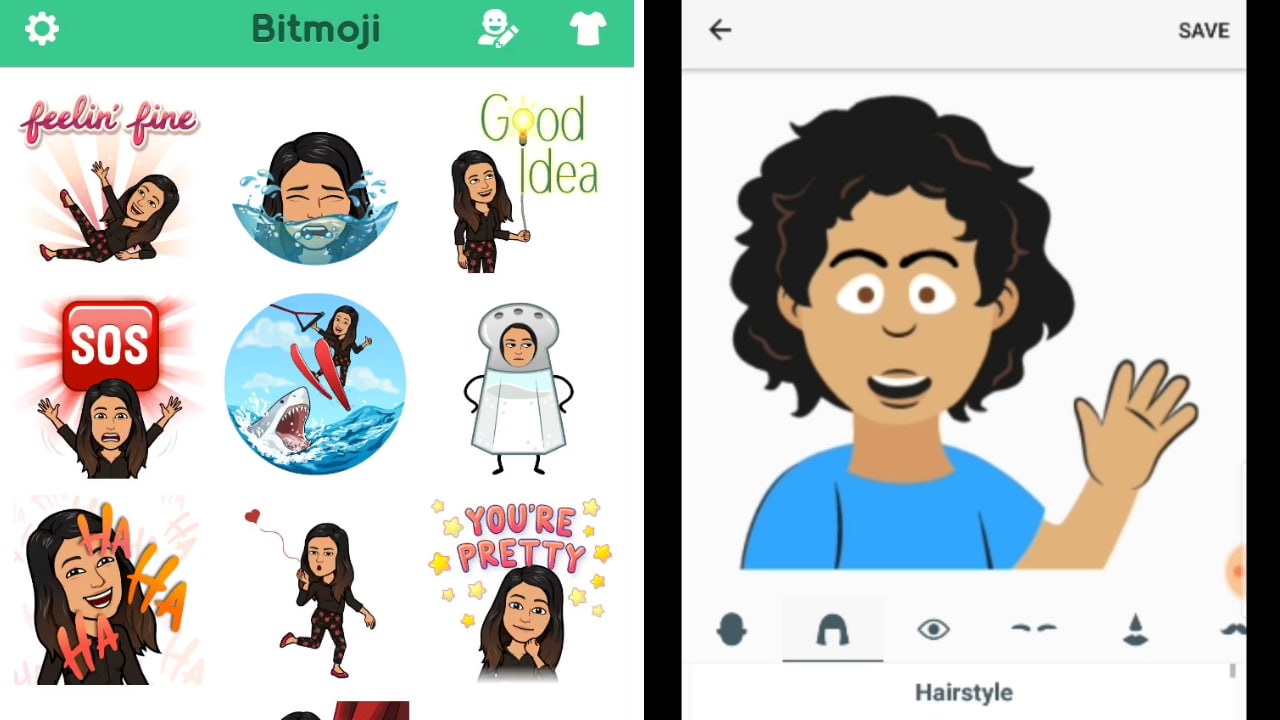 Virtual avatars on Bitmoji (L) and Gboard Minis (R). Image: Tech2[/caption]1) BitmojiBitmoji is a standalone app. The avatar that you create by using the apps acts like your personal emoji. It's basically your virtual avatar as an emoji or a sticker. That means it is static and it does not track your face.Your Bitmoji app can be linked to your Snapchat account.It uses the selfie camera of your phone and allows you to customise a complete avatar as per what you see yourself as.Starting from choosing your hair colour, your face structure to which dress you want your avatar to wear, everything can be chosen with a tap of your finger. The app has added some new clothing options as well.The avatar tries to represent the features that you've chosen in an animated way, but it still tries to keep the Bitmoji close to reality.You can go to your settings and opt for giving the app complete access to your keyboard so whenever you choose to send your personalised sticker, your Bitmoji will pop up on your keyboard.This works on third-party applications as well for example WhatsApp.You can also create Bitmoji's with two people by choosing your friend from the Snapchat contact list.2) Gboard MinisGboard minis is a part of the G Board application. So if you wish to create your own Gboard Mini you'll need to download the Gboard app. After opening the app you'd have to make the app as your default keyboard for it to function.Also, the app would need the permission to gain access to your camera.Like Bitmoji it too creates your virtual avatar in a sticker form.The app gives two types of face emojis: bold emoji and sweet mini.You can choose the stickers section from the keyboard and then find the Mini tab there which looks like a weird shape figure face and create your own mini avatar.The drill remains the same, tap the selfie button, open your selfie camera, take a selfie and your journey to create your own virtual avatar starts there.[caption id="attachment_5227761" align="alignnone" width="1280"]
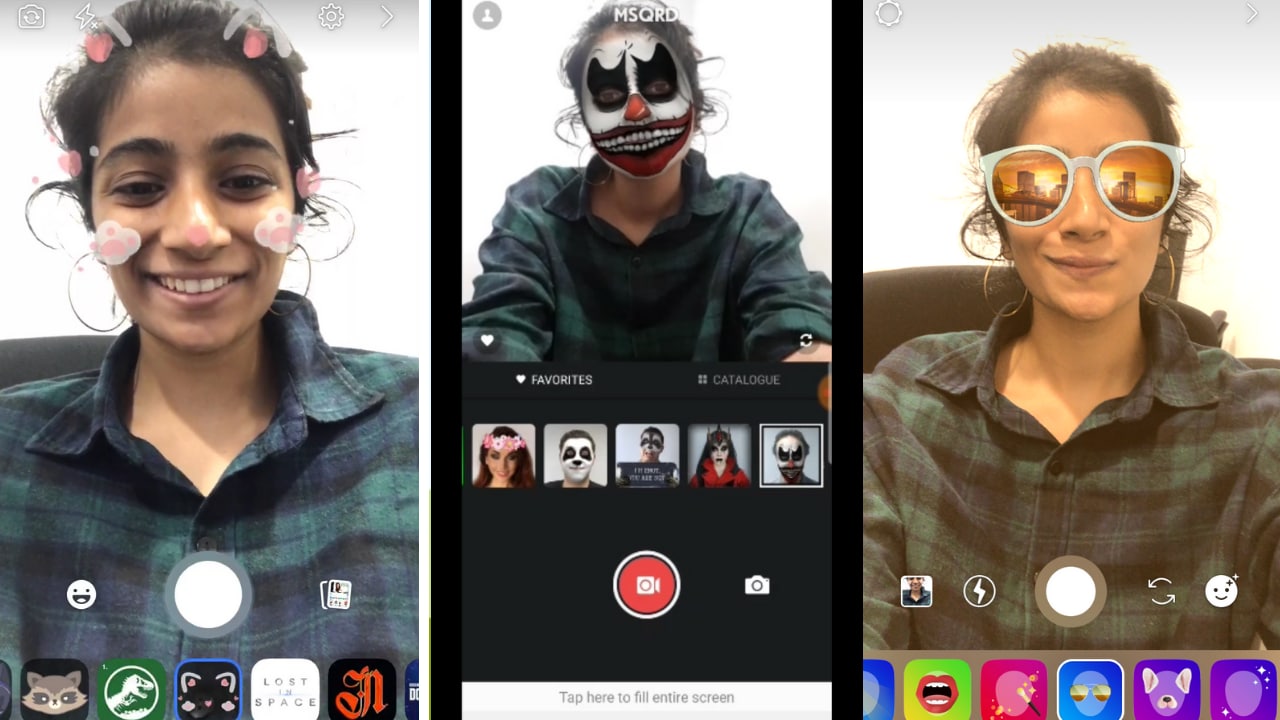 Filters used on Facebook, MSQRD and Instagram respectively. Image: Tech2[/caption]3) Facebook and InstagramFacebook and Instagram come with a ton of filters to animate your virtual avatar. They aren't static and are filled with creative elements.Even though both of them have basically copied Snapchat, they offer filters which are dynamic and even have some which represent the festivals, seasons, that is taking place at that moment.These filters are engaging and also offer a lot of variety.You can choose from a number of filters like having moving cat whiskers on your face to having a dinosaur in your room.The unique thing about it is every time you choose a different filter you can also see the name of the creator by whom the sticker has been made.Instagram had started with eight filters during its inception but now the app comes with about 22 different filters.It offers filters like having a crown of diamonds or like putting on a pair of sunglasses.
First Published:Sep 20, 2018, 20:21:30 IST
Advertisement
Advertisement

Why AI notetakers are raising serious privacy and security concerns
AI notetakers promise effortless meeting summaries, but experts warn they could expose confidential conversations, corporate secrets and personal voiceprints. As businesses increasingly adopt AI-powered meeting assistants, questions over data storage, privacy, consent and legal risks are becoming impossible to ignore
5 min read
China's low-cost AI models are changing the global AI race. Here's why Silicon Valley is worried
As Chinese firms continue to improve performance while keeping prices low, the AI race is no longer just about building the smartest model—it is increasingly becoming a battle over who can deliver the best value
2 min read
China's Kimi K3 challenges US AI leaders with frontier-level performance at lower cost
Chinese artificial intelligence startup Moonshot AI has unveiled its latest open-weight AI model, Kimi K3, with early results suggesting it could compete with some of the world's most advanced AI systems developed by leading US companies
2 min read
How did Instagram run ads promoting child abuse in India?
India has issued a notice to Meta after an investigation alleged that Instagram displayed paid advertisements promoting child sexual abuse material. MeitY ordered Meta to remove such Instagram ads and explain within seven days how they were approved
8 min read
Why has India halted WhatsApp’s username feature before launch?
India has halted WhatsApp’s planned username feature, citing concerns about cybercrime, impersonation, and law enforcement challenges. As Meta races to address security concerns, here’s why MeitY has paused the rollout, what the feature does, and how it could influence privacy and online safety in India
3 min read
Advertisement
Advertisement