


Gmail's right-click feature is going to become a whole lot better, finally!
Soon you’ll have practically any feature you could ask for in that little right-click menu.

Gmail is adding more options to the right-click context menu, and we are so happy to hear that![caption id="attachment_6023861" align="alignnone" width="1024"] Gmail.[/caption]Google has announced that starting this week, it is adding a ton of new options to the menu that shows up when you right click on an email on Gmail. Google has already started rolling out the new feature, but since this is a phased rollout, it will be available to all Gmail users by end of this month.As of now, right clicking on emails shows you only four options — Move to tab, Archive, Mark as Read, Delete.[caption id="attachment_6072251" align="alignnone" width="1280"]
 As of now, we only have four options showing up in the right-click menu. Image: tech2/Nandini Yadav[/caption]After Gmail gets the new features, right-clicking will show you all possible options like Reply, Reply all, Forward, Archive, Delete, Mark as unread, Snooze, Move to, Label as, Mute, Open in new window, and even the option to Find emails by the name of the person whose mail you clicked on.Look at the screenshot below that Google shared, for reference.[caption id="attachment_6072751" align="alignnone" width="1280"]
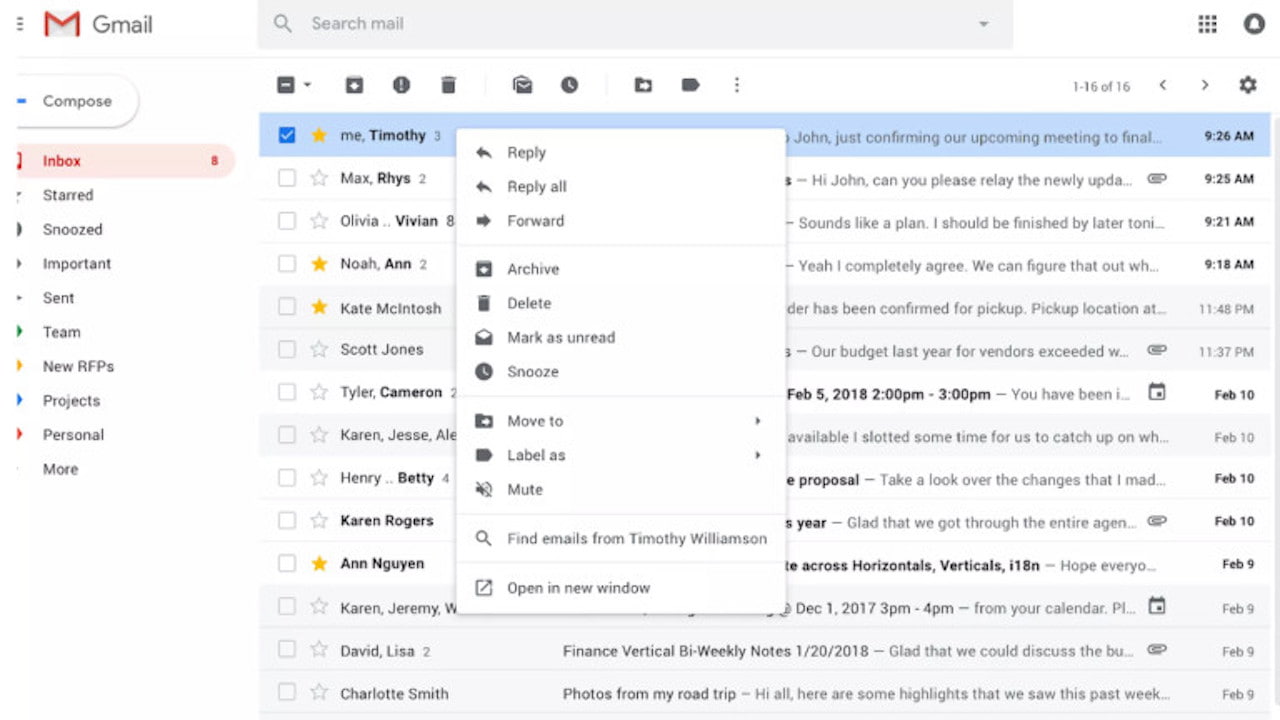 With the new feature, you will see a lot of features nestled in the right-click menu. Image: Google[/caption]In addition to this, if you switch your group emails to conversations, you can also search the subjects by right-clicking on the email.

Why AI notetakers are raising serious privacy and security concerns
China's low-cost AI models are changing the global AI race. Here's why Silicon Valley is worried
China's Kimi K3 challenges US AI leaders with frontier-level performance at lower cost
How did Instagram run ads promoting child abuse in India?
Why has India halted WhatsApp’s username feature before launch?