
Advertisement


Sections
Gmail lets you tag people in a mail using ‘@’ and ‘+’ symbols, here’s how it works
The tagging feature is live in the new Gmail. In case you are still using the old version, you would need to shift to the latest one.

The recently announced design change and new features like Smart Compose have really worked in Gmail’s favour. The app is neater to look at and so much more efficient. However, there is one very important feature Gmail recently received, which we all somehow missed.[caption id="attachment_4445509" align="alignleft" width="380"]![The Gmail app logo. Image: Google]() The Gmail app logo. Image: Google[/caption]The revamped Gmail also lets you ‘@’ mention people on an email thread, just like how you do it on Twitter or Facebook. You can also use a ‘+’ symbol in place of the ‘@’ symbol. The two work the same way.This means, when you compose a mail, in its body, you can now tag a person to whom something is specifically targeted at. To do so, all you have to do is make the @ symbol and start typing their name. You will see a drop-down of all the email addresses that include that name, and you tap and choose the one you are looking for.Essentially, typing @Nandini will bring up a list of people in your contact list with that name, and choosing any of them will add a mailto link labeled with their name. When your recipient clicks that link, it’ll bring up a new compose window so they can write to that contact.
The Gmail app logo. Image: Google[/caption]The revamped Gmail also lets you ‘@’ mention people on an email thread, just like how you do it on Twitter or Facebook. You can also use a ‘+’ symbol in place of the ‘@’ symbol. The two work the same way.This means, when you compose a mail, in its body, you can now tag a person to whom something is specifically targeted at. To do so, all you have to do is make the @ symbol and start typing their name. You will see a drop-down of all the email addresses that include that name, and you tap and choose the one you are looking for.Essentially, typing @Nandini will bring up a list of people in your contact list with that name, and choosing any of them will add a mailto link labeled with their name. When your recipient clicks that link, it’ll bring up a new compose window so they can write to that contact.![new-gmail-mention]() In your composed mail too, if you added two people in the ‘To’ list, and the person you tag in the body is a third person, they will automatically be added to the list of recipients of the mail.This is a very useful feature, especially when you are introducing someone to another contact, or list a bunch of people’s email addresses in a message quickly.In that case, the people you keep adding to the body, keep getting added to the list of recipients automatically. This saves a whole lot of effort.Also, in case you missed it, the new Gmail also has a feature which reminds you to attach a file when you hit send, in a case where you mention that you are attaching a file or say please find enclosed.Both these features are a part of the new Gmail, and are already live. In case you haven’t already switched to the new Gmail, you can do so by tapping on the Gear icon on the top right. The first option in the drop down would be to ‘Try the new Gmail’. Tap that and you will then be using a much better version of Google’s email service.
In your composed mail too, if you added two people in the ‘To’ list, and the person you tag in the body is a third person, they will automatically be added to the list of recipients of the mail.This is a very useful feature, especially when you are introducing someone to another contact, or list a bunch of people’s email addresses in a message quickly.In that case, the people you keep adding to the body, keep getting added to the list of recipients automatically. This saves a whole lot of effort.Also, in case you missed it, the new Gmail also has a feature which reminds you to attach a file when you hit send, in a case where you mention that you are attaching a file or say please find enclosed.Both these features are a part of the new Gmail, and are already live. In case you haven’t already switched to the new Gmail, you can do so by tapping on the Gear icon on the top right. The first option in the drop down would be to ‘Try the new Gmail’. Tap that and you will then be using a much better version of Google’s email service.
 The Gmail app logo. Image: Google[/caption]The revamped Gmail also lets you ‘@’ mention people on an email thread, just like how you do it on Twitter or Facebook. You can also use a ‘+’ symbol in place of the ‘@’ symbol. The two work the same way.This means, when you compose a mail, in its body, you can now tag a person to whom something is specifically targeted at. To do so, all you have to do is make the @ symbol and start typing their name. You will see a drop-down of all the email addresses that include that name, and you tap and choose the one you are looking for.Essentially, typing @Nandini will bring up a list of people in your contact list with that name, and choosing any of them will add a mailto link labeled with their name. When your recipient clicks that link, it’ll bring up a new compose window so they can write to that contact.
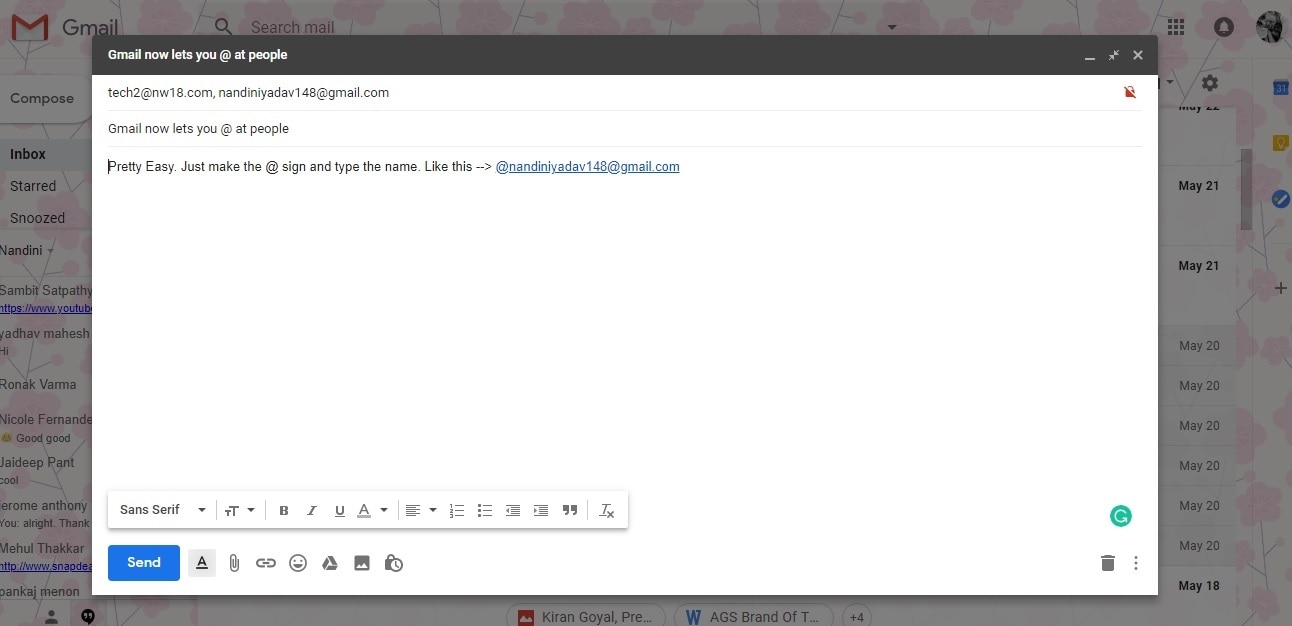 In your composed mail too, if you added two people in the ‘To’ list, and the person you tag in the body is a third person, they will automatically be added to the list of recipients of the mail.This is a very useful feature, especially when you are introducing someone to another contact, or list a bunch of people’s email addresses in a message quickly.In that case, the people you keep adding to the body, keep getting added to the list of recipients automatically. This saves a whole lot of effort.
First Published:May 23, 2018, 11:05:36 IST
Advertisement
Advertisement

Why AI notetakers are raising serious privacy and security concerns
AI notetakers promise effortless meeting summaries, but experts warn they could expose confidential conversations, corporate secrets and personal voiceprints. As businesses increasingly adopt AI-powered meeting assistants, questions over data storage, privacy, consent and legal risks are becoming impossible to ignore
5 min read
China's low-cost AI models are changing the global AI race. Here's why Silicon Valley is worried
As Chinese firms continue to improve performance while keeping prices low, the AI race is no longer just about building the smartest model—it is increasingly becoming a battle over who can deliver the best value
2 min read
China's Kimi K3 challenges US AI leaders with frontier-level performance at lower cost
Chinese artificial intelligence startup Moonshot AI has unveiled its latest open-weight AI model, Kimi K3, with early results suggesting it could compete with some of the world's most advanced AI systems developed by leading US companies
2 min read
How did Instagram run ads promoting child abuse in India?
India has issued a notice to Meta after an investigation alleged that Instagram displayed paid advertisements promoting child sexual abuse material. MeitY ordered Meta to remove such Instagram ads and explain within seven days how they were approved
8 min read
Why has India halted WhatsApp’s username feature before launch?
India has halted WhatsApp’s planned username feature, citing concerns about cybercrime, impersonation, and law enforcement challenges. As Meta races to address security concerns, here’s why MeitY has paused the rollout, what the feature does, and how it could influence privacy and online safety in India
3 min read
Advertisement
Advertisement