
Advertisement


Sections
Gmail can now be set as the default email client in iOS 14 and iPadOS 14: How it works
Here's how you can set Gmail as your default email client in iOS 14 and iPadOS 14.

Google has announced that its Gmail service can officially be set as the default mail client in iOS 14 and iPadOS 14According to Google, users can make Gmail the default mail app by going to the iPhone or iPad open settings and then scrolling down and tapping on Gmail. Users then need to tap Default Mail app followed by the Gmail icon.To add Gmail to one's dock, one simply needs to tap and hold the Gmail app icon before dragging and releasing it on the dock.Gmail is only the latest app to introduce support for the new iOS 14 feature. Microsoft's Outlook can already be selected as the default mail client, as can Basecamp-created email service Hey. [caption id="attachment_8840731" align="alignnone" width="1280"]![iOS 14 already allows Outlook users to choose tje email client as default.]() iOS 14 already allows Outlook users to choose tje email client as default.[/caption]Apple released iOS 14 and iPadOS 14 to the public on Wednesday, 16 September and as per analytics data, about 26 per cent users have adopted the software update thus far.iOS 14 added the option for users to set third-party email applications as the default for iPhone and iPad devices running the latest version of Apple’s operating system. However, The Verge recently reported an iOS bug that automatically switches third-party browser and email applications back to Apple’s default Mail and Safari after a restart. Apple is yet to comment on the issue.
iOS 14 already allows Outlook users to choose tje email client as default.[/caption]Apple released iOS 14 and iPadOS 14 to the public on Wednesday, 16 September and as per analytics data, about 26 per cent users have adopted the software update thus far.iOS 14 added the option for users to set third-party email applications as the default for iPhone and iPad devices running the latest version of Apple’s operating system. However, The Verge recently reported an iOS bug that automatically switches third-party browser and email applications back to Apple’s default Mail and Safari after a restart. Apple is yet to comment on the issue.
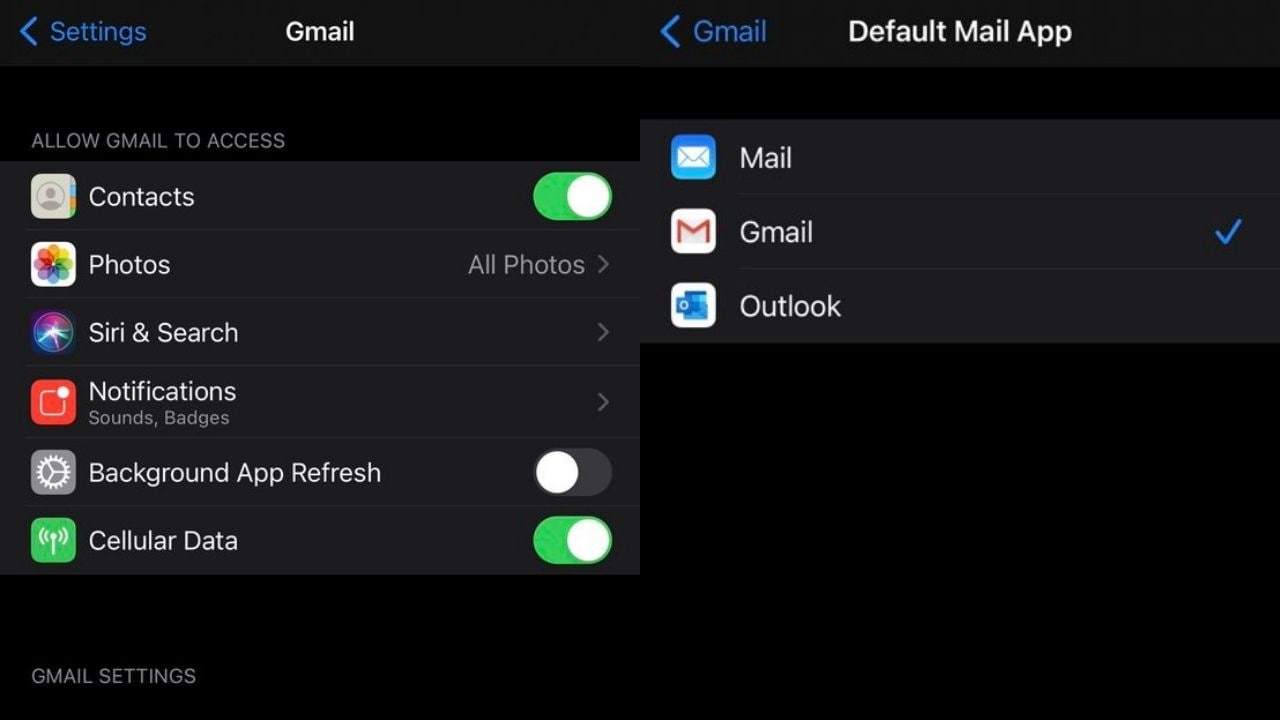 iOS 14 already allows Outlook users to choose tje email client as default.[/caption]Apple released iOS 14 and iPadOS 14 to the public on Wednesday, 16 September and as per analytics data, about 26 per cent users have adopted the software update thus far.iOS 14 added the option for users to set third-party email applications as the default for iPhone and iPad devices running the latest version of Apple’s operating system. However, The Verge recently reported an iOS bug that automatically switches third-party browser and email applications back to Apple’s default Mail and Safari after a restart. Apple is yet to comment on the issue.
First Published:Sep 22, 2020, 17:13:37 IST
Advertisement
Advertisement

Why AI notetakers are raising serious privacy and security concerns
AI notetakers promise effortless meeting summaries, but experts warn they could expose confidential conversations, corporate secrets and personal voiceprints. As businesses increasingly adopt AI-powered meeting assistants, questions over data storage, privacy, consent and legal risks are becoming impossible to ignore
5 min read
China's low-cost AI models are changing the global AI race. Here's why Silicon Valley is worried
As Chinese firms continue to improve performance while keeping prices low, the AI race is no longer just about building the smartest model—it is increasingly becoming a battle over who can deliver the best value
2 min read
China's Kimi K3 challenges US AI leaders with frontier-level performance at lower cost
Chinese artificial intelligence startup Moonshot AI has unveiled its latest open-weight AI model, Kimi K3, with early results suggesting it could compete with some of the world's most advanced AI systems developed by leading US companies
2 min read
How did Instagram run ads promoting child abuse in India?
India has issued a notice to Meta after an investigation alleged that Instagram displayed paid advertisements promoting child sexual abuse material. MeitY ordered Meta to remove such Instagram ads and explain within seven days how they were approved
8 min read
Why has India halted WhatsApp’s username feature before launch?
India has halted WhatsApp’s planned username feature, citing concerns about cybercrime, impersonation, and law enforcement challenges. As Meta races to address security concerns, here’s why MeitY has paused the rollout, what the feature does, and how it could influence privacy and online safety in India
3 min read
Advertisement
Advertisement