
Advertisement


Sections
Android 8.0 Oreo: Here are some of the major updates in the newest operating system
Hints from the code and promotional videos have previously indicated that the operating system could be named Android Oreo or Android Oatmeal Cookie.

Android 8.0 officially landed on 21 August, during first total solar eclipse in the US since 1917. The launch was conducted through a livestream.[caption id="attachment_3947723" align="alignleft" width="380"]![Android O. Oreo]() Android O. Oreo[/caption]Developers have had access to a preview version of Google's latest mobile operating system since mid-March, with updated versions releasing in May, June and July. Hints from the code and promotional videos have previously indicated that the operating system could be named Android Oreo or Android Oatmeal Cookie. We now know that Android 8.0 is officially called Oreo.The Android Oreo presentation at Google I/O revealed a number of new features expected in the latest version of the operating system. New features include icon shapes, dots for notifications, more security options, an autofill fill service, smart text selection, and a picture-in-picture mode.Some of the features were limited to the Pixel phones during the releases of the developer previews. Here is everything that is new in Android Oreo.User Interface and ExperienceUsers can now organise notifications into custom channels, and modify the alerts for the entire channel. This can be specifying the sounds if the notification triggers a vibration, and if the notification is allowed to override the do not disturb setting. Developers can specify the importance of notifications, with a weightage from 0 to 4. There are also badges on the applications, known as notification dots that indicate which applications have unread notifications.Developers can set background colours for notifications, to indicate the nature of the notification. Developers can also create a notification timeout, which is particularly useful for time sensitive alerts. Developers can choose to specify a time period, after which the notification is cancelled if the user does not read it. Users can choose to snooze notifications for a period of time, and the notifications will start appearing after the time period has finished.[caption id="attachment_3959021" align="alignnone" width="825"]
Android O. Oreo[/caption]Developers have had access to a preview version of Google's latest mobile operating system since mid-March, with updated versions releasing in May, June and July. Hints from the code and promotional videos have previously indicated that the operating system could be named Android Oreo or Android Oatmeal Cookie. We now know that Android 8.0 is officially called Oreo.The Android Oreo presentation at Google I/O revealed a number of new features expected in the latest version of the operating system. New features include icon shapes, dots for notifications, more security options, an autofill fill service, smart text selection, and a picture-in-picture mode.Some of the features were limited to the Pixel phones during the releases of the developer previews. Here is everything that is new in Android Oreo.User Interface and ExperienceUsers can now organise notifications into custom channels, and modify the alerts for the entire channel. This can be specifying the sounds if the notification triggers a vibration, and if the notification is allowed to override the do not disturb setting. Developers can specify the importance of notifications, with a weightage from 0 to 4. There are also badges on the applications, known as notification dots that indicate which applications have unread notifications.Developers can set background colours for notifications, to indicate the nature of the notification. Developers can also create a notification timeout, which is particularly useful for time sensitive alerts. Developers can choose to specify a time period, after which the notification is cancelled if the user does not read it. Users can choose to snooze notifications for a period of time, and the notifications will start appearing after the time period has finished.[caption id="attachment_3959021" align="alignnone" width="825"]![Android Oreo notifications updates]() Android Oreo notifications updates[/caption]An autofill framework in the operating system makes the repeated filling of forms easy for the user. This can range from sign up information to a new service, or credit card information to make a payment. The feature will prevent frustration and repetitiveness by allowing users to quickly fill in a form. Users will have to opt-in for the Autofill framework, after which new and existing applications can make use of the feature.A new picture in picture mode, which was initially introduced for Android TV is now available on Android-based smartphones as well. The mode is meant mostly meant for videos, so users can continue operating the device without interruptions even while watching a video. One of the earliest applications to use this new feature, is WhatsApp, which had included a picture in picture mode for video calls in the beta version, meant to be rolled out with the launch of Android Oreo.[caption id="attachment_3959025" align="alignnone" width="825"]
Android Oreo notifications updates[/caption]An autofill framework in the operating system makes the repeated filling of forms easy for the user. This can range from sign up information to a new service, or credit card information to make a payment. The feature will prevent frustration and repetitiveness by allowing users to quickly fill in a form. Users will have to opt-in for the Autofill framework, after which new and existing applications can make use of the feature.A new picture in picture mode, which was initially introduced for Android TV is now available on Android-based smartphones as well. The mode is meant mostly meant for videos, so users can continue operating the device without interruptions even while watching a video. One of the earliest applications to use this new feature, is WhatsApp, which had included a picture in picture mode for video calls in the beta version, meant to be rolled out with the launch of Android Oreo.[caption id="attachment_3959025" align="alignnone" width="825"]![Android Oreo picture in picture mode]() Android Oreo picture in picture mode[/caption]One of the most interesting changes in the UI is the support for adaptive icons. Original Equipment Manufacturers can specify a look and feel for the UI by choosing between various icon shapes. Different shapes can be used on some models. The feat is achieved by applying masks over a base layer. The supported shapes are Circle, Squircle, Rounded Square and Square. Adaptive icons can be created using Android Studio.New colour management features allows developers to load bitmaps with an extended colour gamut to take advantage of newer devices with displays that support wider colour gamuts. Android Oreo also allows for multiple displays, with users being able to move activity from one screen to another. An App Category feature allows developers to categorise their applications, which will be clustered together when presented to the user. There is also a new Android TV launcher that allows users to configure which channels they want to see on the homescreen. The developers have the option of publishing multiple channels.Under the hoodEach application is now allocated a cache budget. When the system is low on resources, the applications that exceed the cache budget the most will be the first to have their cached files deleted. Developers can avoid the penalty by making sure that their applications stay within the limit of the cache allocated to them. Developers can use a special request to indicate that they need cache space for especially large files, in which case, Android will clear the cache to accommodate the request.Content refreshing is now more streamline experienced, as there is now an easier way for applications to check if they are displaying the latest content on the screen. Developers can also set custom triggers to update the content when it is stale or outdated, even without a specific request from the user. There are now background execution limits, to make sure that the applications running in the background are not hogging up an inordinate amount of system resources. There are improvements in the OS that allow developers to comply with these new background execution limits.Media playback should be significantly improved for users, as now there is fine-grained control to scrub to a particular frame in a video. The MediaPlayer now also has support for DRM protected material. A VolumeShaper functionality allows developers to integrate support for fade-outs, fade-ins and crossfades. Streaming from the device has been improved with the support for MPEG2_TS. Applications can also now mix multiple audio and video tracks at once, for streaming purposes. This is particularly useful for streaming gameplay videos where users can capture the screen, themselves through the front-facing camera, the audio from a game, and any commentary from the user.Connectivity and security There is now support for Wi-Fi Aware, an energy-efficient way by which supported hardware can discover and chat with each other without a Wi-Fi hotspot or an internet connection. There is also a support for the new Bluetooth Low-Energy (BLE) 5.0 standard.[caption id="attachment_3959059" align="alignnone" width="825"]
Android Oreo picture in picture mode[/caption]One of the most interesting changes in the UI is the support for adaptive icons. Original Equipment Manufacturers can specify a look and feel for the UI by choosing between various icon shapes. Different shapes can be used on some models. The feat is achieved by applying masks over a base layer. The supported shapes are Circle, Squircle, Rounded Square and Square. Adaptive icons can be created using Android Studio.New colour management features allows developers to load bitmaps with an extended colour gamut to take advantage of newer devices with displays that support wider colour gamuts. Android Oreo also allows for multiple displays, with users being able to move activity from one screen to another. An App Category feature allows developers to categorise their applications, which will be clustered together when presented to the user. There is also a new Android TV launcher that allows users to configure which channels they want to see on the homescreen. The developers have the option of publishing multiple channels.Under the hoodEach application is now allocated a cache budget. When the system is low on resources, the applications that exceed the cache budget the most will be the first to have their cached files deleted. Developers can avoid the penalty by making sure that their applications stay within the limit of the cache allocated to them. Developers can use a special request to indicate that they need cache space for especially large files, in which case, Android will clear the cache to accommodate the request.Content refreshing is now more streamline experienced, as there is now an easier way for applications to check if they are displaying the latest content on the screen. Developers can also set custom triggers to update the content when it is stale or outdated, even without a specific request from the user. There are now background execution limits, to make sure that the applications running in the background are not hogging up an inordinate amount of system resources. There are improvements in the OS that allow developers to comply with these new background execution limits.Media playback should be significantly improved for users, as now there is fine-grained control to scrub to a particular frame in a video. The MediaPlayer now also has support for DRM protected material. A VolumeShaper functionality allows developers to integrate support for fade-outs, fade-ins and crossfades. Streaming from the device has been improved with the support for MPEG2_TS. Applications can also now mix multiple audio and video tracks at once, for streaming purposes. This is particularly useful for streaming gameplay videos where users can capture the screen, themselves through the front-facing camera, the audio from a game, and any commentary from the user.Connectivity and security There is now support for Wi-Fi Aware, an energy-efficient way by which supported hardware can discover and chat with each other without a Wi-Fi hotspot or an internet connection. There is also a support for the new Bluetooth Low-Energy (BLE) 5.0 standard.[caption id="attachment_3959059" align="alignnone" width="825"]![Google Play Protect]() Google Play Protect[/caption]A smart sharing feature allows the operating system to guess the context of a photo, and pick the best application to hand the image over to. For example, if the photo of a receipt is clicked, an expense tracking application is pulled up, but if a selfie is clicked, an instant messaging client is handed over the image. The phone learns the behaviour of the user over time, to improve the guesses of the smart sharing feature. A smart copy feature enables similar functionality for text, figuring out if an address, phone number or name of an entity is copied, and directing the copied information to the most relevant application. For example, if an address is selected, a floating toolbar suggests applications, including a maps app, into which the selected text can directly be pasted.There are some new permissions that are available to developers. Applications can be configured to programmatically answer phone calls, which may allow for a new type of applications to use the added functionality. Android has normal and dangerous grades of permissions, for security purposes, and the ability to answer phone calls is classified as a dangerous permission. Browsing on the web has now been made more secure with the integration of the Google Safe Browsing API.Android Oreo succeeds Android Nougat, which was released in August 2016. As expected, the first phone to get Android 8.0 is the Google Pixel and the Google Pixel XL. The Nexus 5X and the Nexus 6P will also get the update. Android Oreo has been confirmed to land on the OnePlus 5, as well as the OnePlus 3 and 3T later this year.HMD Global has confirmed Android Oreo updates for the Nokia 3,5 and 6 smartphones. A number of Xiaomi Redmi and Mi devices will also get the update, although Nougat is still in the process of being rolled out.
Google Play Protect[/caption]A smart sharing feature allows the operating system to guess the context of a photo, and pick the best application to hand the image over to. For example, if the photo of a receipt is clicked, an expense tracking application is pulled up, but if a selfie is clicked, an instant messaging client is handed over the image. The phone learns the behaviour of the user over time, to improve the guesses of the smart sharing feature. A smart copy feature enables similar functionality for text, figuring out if an address, phone number or name of an entity is copied, and directing the copied information to the most relevant application. For example, if an address is selected, a floating toolbar suggests applications, including a maps app, into which the selected text can directly be pasted.There are some new permissions that are available to developers. Applications can be configured to programmatically answer phone calls, which may allow for a new type of applications to use the added functionality. Android has normal and dangerous grades of permissions, for security purposes, and the ability to answer phone calls is classified as a dangerous permission. Browsing on the web has now been made more secure with the integration of the Google Safe Browsing API.Android Oreo succeeds Android Nougat, which was released in August 2016. As expected, the first phone to get Android 8.0 is the Google Pixel and the Google Pixel XL. The Nexus 5X and the Nexus 6P will also get the update. Android Oreo has been confirmed to land on the OnePlus 5, as well as the OnePlus 3 and 3T later this year.HMD Global has confirmed Android Oreo updates for the Nokia 3,5 and 6 smartphones. A number of Xiaomi Redmi and Mi devices will also get the update, although Nougat is still in the process of being rolled out.
 Android O. Oreo[/caption]Developers have had access to a preview version of Google's latest mobile operating system since mid-March, with updated versions releasing in May, June and July. Hints from the code and promotional videos have previously indicated that the operating system could be named Android Oreo or Android Oatmeal Cookie. We now know that Android 8.0 is officially called Oreo.The Android Oreo presentation at Google I/O revealed a number of new features expected in the latest version of the operating system. New features include icon shapes, dots for notifications, more security options, an autofill fill service, smart text selection, and a picture-in-picture mode.Some of the features were limited to the Pixel phones during the releases of the developer previews. Here is everything that is new in Android Oreo.User Interface and ExperienceUsers can now organise notifications into custom channels, and modify the alerts for the entire channel. This can be specifying the sounds if the notification triggers a vibration, and if the notification is allowed to override the do not disturb setting. Developers can specify the importance of notifications, with a weightage from 0 to 4. There are also badges on the applications, known as notification dots that indicate which applications have unread notifications.
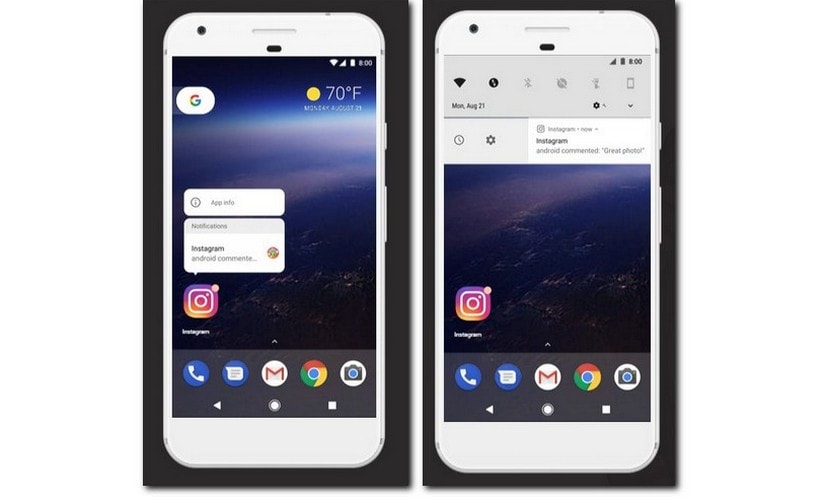 Android Oreo notifications updates[/caption]An autofill framework in the operating system makes the repeated filling of forms easy for the user. This can range from sign up information to a new service, or credit card information to make a payment. The feature will prevent frustration and repetitiveness by allowing users to quickly fill in a form. Users will have to opt-in for the Autofill framework, after which new and existing applications can make use of the feature.A new picture in picture mode, which was initially introduced for Android TV is now available on Android-based smartphones as well. The mode is meant mostly meant for videos, so users can continue operating the device without interruptions even while watching a video. One of the earliest applications to use this new feature, is WhatsApp, which had included a picture in picture mode for video calls in the beta version, meant to be rolled out with the launch of Android Oreo.[caption id="attachment_3959025" align="alignnone" width="825"]
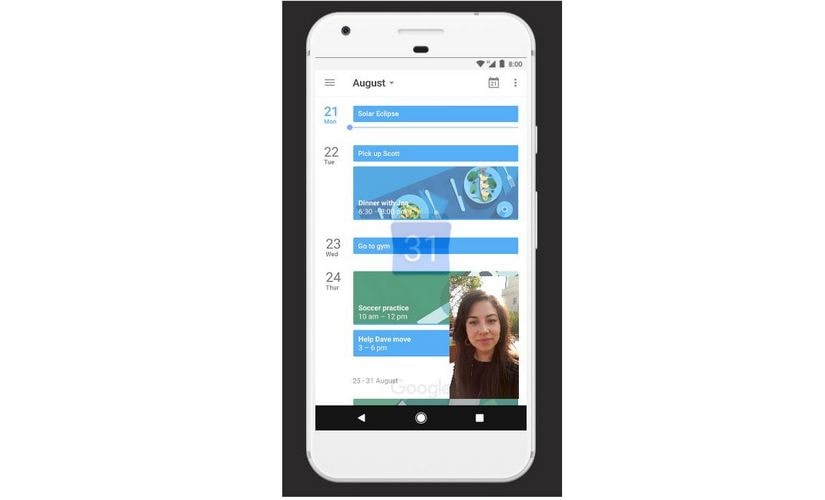 Android Oreo picture in picture mode[/caption]One of the most interesting changes in the UI is the support for adaptive icons. Original Equipment Manufacturers can specify a look and feel for the UI by choosing between various icon shapes. Different shapes can be used on some models. The feat is achieved by applying masks over a base layer. The supported shapes are Circle, Squircle, Rounded Square and Square. Adaptive icons can be created using Android Studio.New colour management features allows developers to load bitmaps with an extended colour gamut to take advantage of newer devices with displays that support wider colour gamuts. Android Oreo also allows for multiple displays, with users being able to move activity from one screen to another. An App Category feature allows developers to categorise their applications, which will be clustered together when presented to the user. There is also a new Android TV launcher that allows users to configure which channels they want to see on the homescreen. The developers have the option of publishing multiple channels.Under the hoodEach application is now allocated a cache budget. When the system is low on resources, the applications that exceed the cache budget the most will be the first to have their cached files deleted. Developers can avoid the penalty by making sure that their applications stay within the limit of the cache allocated to them. Developers can use a special request to indicate that they need cache space for especially large files, in which case, Android will clear the cache to accommodate the request.Content refreshing is now more streamline experienced, as there is now an easier way for applications to check if they are displaying the latest content on the screen. Developers can also set custom triggers to update the content when it is stale or outdated, even without a specific request from the user. There are now background execution limits, to make sure that the applications running in the background are not hogging up an inordinate amount of system resources. There are improvements in the OS that allow developers to comply with these new background execution limits.Media playback should be significantly improved for users, as now there is fine-grained control to scrub to a particular frame in a video. The MediaPlayer now also has support for DRM protected material. A VolumeShaper functionality allows developers to integrate support for fade-outs, fade-ins and crossfades. Streaming from the device has been improved with the support for MPEG2_TS. Applications can also now mix multiple audio and video tracks at once, for streaming purposes. This is particularly useful for streaming gameplay videos where users can capture the screen, themselves through the front-facing camera, the audio from a game, and any commentary from the user.Connectivity and security There is now support for Wi-Fi Aware, an energy-efficient way by which supported hardware can discover and chat with each other without a Wi-Fi hotspot or an internet connection. There is also a support for the new Bluetooth Low-Energy (BLE) 5.0 standard.[caption id="attachment_3959059" align="alignnone" width="825"]
 Google Play Protect[/caption]A smart sharing feature allows the operating system to guess the context of a photo, and pick the best application to hand the image over to. For example, if the photo of a receipt is clicked, an expense tracking application is pulled up, but if a selfie is clicked, an instant messaging client is handed over the image. The phone learns the behaviour of the user over time, to improve the guesses of the smart sharing feature. A smart copy feature enables similar functionality for text, figuring out if an address, phone number or name of an entity is copied, and directing the copied information to the most relevant application. For example, if an address is selected, a floating toolbar suggests applications, including a maps app, into which the selected text can directly be pasted.There are some new permissions that are available to developers. Applications can be configured to programmatically answer phone calls, which may allow for a new type of applications to use the added functionality. Android has normal and dangerous grades of permissions, for security purposes, and the ability to answer phone calls is classified as a dangerous permission. Browsing on the web has now been made more secure with the integration of the Google Safe Browsing API.Android Oreo succeeds Android Nougat, which was released in August 2016. As expected, the first phone to get Android 8.0 is the Google Pixel and the Google Pixel XL. The Nexus 5X and the Nexus 6P will also get the update. Android Oreo has been confirmed to land on the OnePlus 5, as well as the OnePlus 3 and 3T later this year.HMD Global has confirmed Android Oreo updates for the Nokia 3,5 and 6 smartphones. A number of Xiaomi Redmi and Mi devices will also get the update, although Nougat is still in the process of being rolled out.
First Published:Aug 22, 2017, 07:24:50 IST
Advertisement
Advertisement

Why AI notetakers are raising serious privacy and security concerns
AI notetakers promise effortless meeting summaries, but experts warn they could expose confidential conversations, corporate secrets and personal voiceprints. As businesses increasingly adopt AI-powered meeting assistants, questions over data storage, privacy, consent and legal risks are becoming impossible to ignore
5 min read
China's low-cost AI models are changing the global AI race. Here's why Silicon Valley is worried
As Chinese firms continue to improve performance while keeping prices low, the AI race is no longer just about building the smartest model—it is increasingly becoming a battle over who can deliver the best value
2 min read
China's Kimi K3 challenges US AI leaders with frontier-level performance at lower cost
Chinese artificial intelligence startup Moonshot AI has unveiled its latest open-weight AI model, Kimi K3, with early results suggesting it could compete with some of the world's most advanced AI systems developed by leading US companies
2 min read
How did Instagram run ads promoting child abuse in India?
India has issued a notice to Meta after an investigation alleged that Instagram displayed paid advertisements promoting child sexual abuse material. MeitY ordered Meta to remove such Instagram ads and explain within seven days how they were approved
8 min read
Why has India halted WhatsApp’s username feature before launch?
India has halted WhatsApp’s planned username feature, citing concerns about cybercrime, impersonation, and law enforcement challenges. As Meta races to address security concerns, here’s why MeitY has paused the rollout, what the feature does, and how it could influence privacy and online safety in India
3 min read
Advertisement
Advertisement