
Advertisement


Sections
How to turn off auto-playing videos on Facebook
Facebook's News Feed now automatically plays videos when you scroll through it, and that can be frustrating at times. Here's how you prevent that from happening.

Facebook's News Feed now automatically plays videos when you scroll through it, and that can be frustrating at times. Here's how you prevent that from happening.In order to stop auto playing of videos, select click on the Settings under your profile icon on the Facebook page.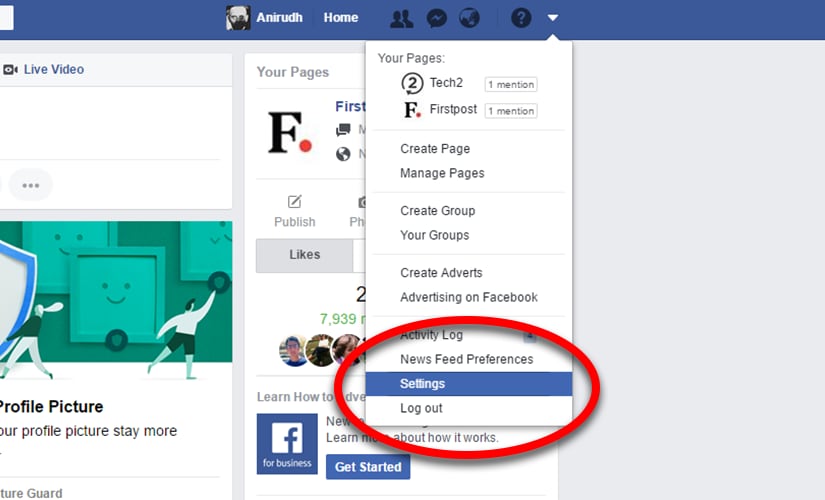 Select the Videos tab and then change the Auto-play Videos setting to Off.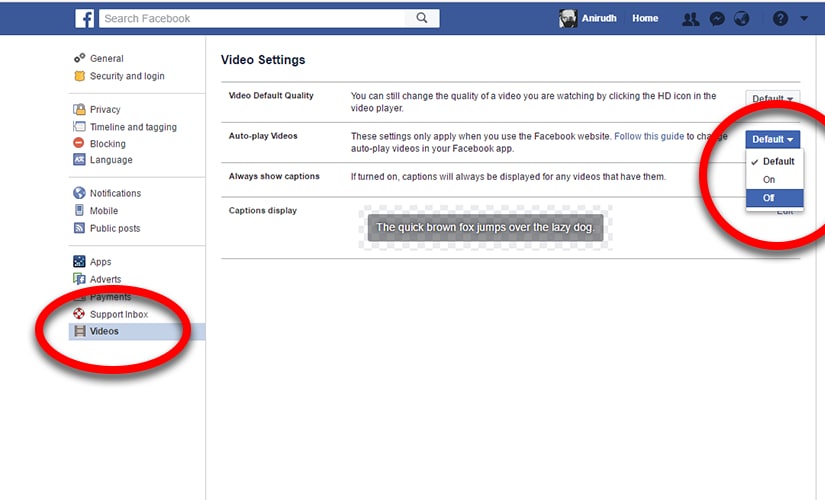
First Published:Jun 22, 2017, 15:17:08 IST
Advertisement
Advertisement

History Today: When Oppenheimer tested the first atomic bomb
The first atomic bomb, nicknamed 'The Gadget', was launched at the Trinity test site in Alamogordo, New Mexico, on July 16, 1945. Led by physicist J Robert Oppenheimer, the launch ushered in a new era - the nuclear age. The test was part of the Manhattan Project, which brought together some of the greatest scientific minds of the time, including Enrico Fermi, Richard Feynman and Niels Bohr
Who is attending Pope Francis' funeral in Rome and who isn't?
The funeral of Pope Francis will be held on April 26. He is currently lying in state at the St Peter's Basilica, Vatican, where crowds of people have already visited to pay their tributes. Several world leaders are expected to turn up at the funeral to pay their respects to the 88-year-old pontiff. Here are lists of people who will visit the funeral and who will give it a miss
History Today: When Iran's Supreme leader issued a fatwa against Salman Rushdie
A fatwa or death sentence was issued against author Salman Rushdie by Iran's Supreme Leader Ayatollah Ruhollah Khomeini on February 14, 1989. It was issued after massive protests broke out following the release of his novel 'The Satanic Verses'. Meanwhile, an attack on a convoy carrying CRPF personnel took place in Jammu and Kashmir in 2019. It later came to be known as the Pulwama attack
T20 World Cup 2021: Brett Lee believes this could be the year of 'underdogs' Australia
"I sense the belief in the Australia camp and I think there is some real momentum there. Everything is clicking nicely ahead of Thursday's semi-final against Pakistan," Lee wrote in his column for ICC.
Farm-sector bills empower farmers by opening more choices, bypassing influential middlemen
No farmer has been rendered any worse-off pursuant to these farm bills. They can not only continue availing benefits under the old system, but can also simultaneously engage in direct trade
Advertisement
Advertisement